liveBook · Manning

Em element

As explained in Design for Developers

The HTML em element marks text that carries emphasis.

The HTML <em> element marks text that carries emphasis. Choose it when italics communicate meaning, not merely appearance. section 8.1.3

Choose the markup according to the purpose of the text:

  • Use <em> when italic styling expresses emphasis. section 8.1.3
  • Use <i> when italics convey an alternate mood or voice, or distinguish idiomatic, technical, or taxonomical text. section 8.1.3
  • Use a generic HTML element with a CSS class when italics are purely stylistic. section 8.1.3

A semantic choice

When a sentence needs a word to receive emphasis, wrap that word in <em>. This keeps the markup semantic and supports accessibility instead of using italics only as visual decoration. section 8.1.3

Figure 8.10 Italics aren’t just slanted; they have design elements added that make the slant feel more cursive and natural.
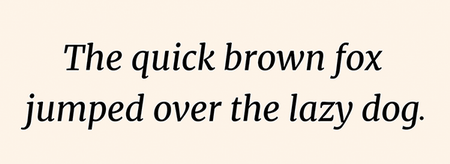
Compare designed italics with merely slanted oblique text before choosing how emphasis should appear. section 8.1.3


How Design for Developers covers it

How deep it goes
Distinguishes emphasis, alternate voice, specialized text, and purely stylistic italics, while stopping short of implementation detail.
Examples
Uses italics, oblique fonts, the <em> tag, the <i> tag, and CSS classes as contrasting examples.
What it assumes
Assumes basic HTML and CSS awareness while teaching why markup semantics matter for accessibility.
What you can do after
Apply semantic HTML to distinguish meaningful emphasis from voice, specialized text, and visual styling.
How it connects
Connects semantic HTML, italics, oblique fonts, CSS, and accessibility.

Also explained in

Compare how 2 books explain em element →

Related concepts

This explainer was generated by Manning's knowledge graph from the text of Design for Developers. The section links point to the parts of the book it draws on.