An email message header is a block of delivery and authentication information that helps investigate suspicious messages. When an unexpected email requests a link click or sensitive information, inspect its headers and source rather than trusting its appearance. section 7.1.3
Use headers for a practical phishing check:
- Open the message source or header information in your email client. section 7.1.3
- Copy the header and source text into an approved AI service for analysis. section 7.1.3
- Review authentication results such as SPF, DKIM, and DMARC, while treating the result as guidance rather than automatic proof. section 7.1.3
Finding and analyzing headers
In Outlook for Mac, right-click the message and choose View Source. In Outlook for PC, open the message in a new window, select File, then Properties. Paste the resulting text into M365 Copilot and ask whether the email is a phishing attempt. section 7.1.3
Figure 7.2 Finding the source text and headers of an email in Outlook for Mac and PC
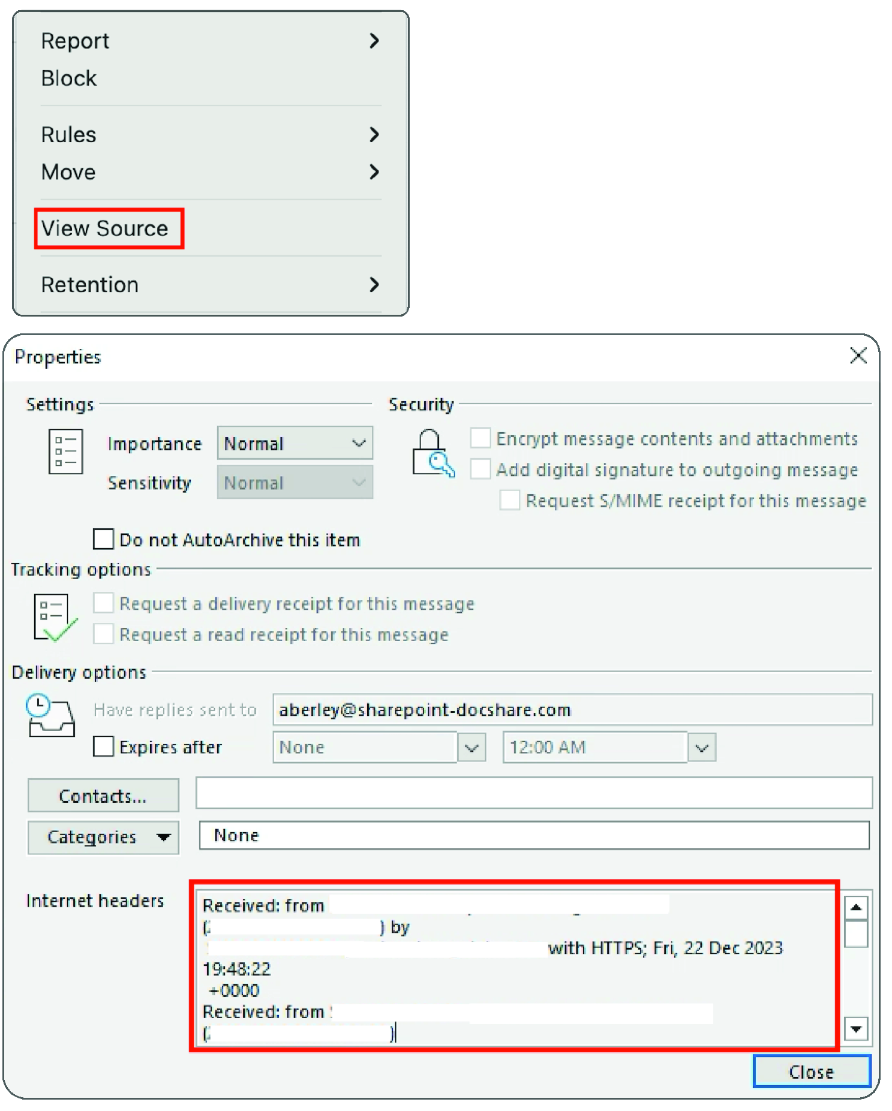
Shows where Outlook for Mac and PC expose message source and header information. section 7.1.3
