A user is a person who interacts with or is intended to use a visualization, application, or other product. Effective design starts with understanding what users need, what they can grasp quickly, and whether the result answers their questions. section 1.3
Designing for users means:
- Distinguishing users from stakeholders: stakeholders request the visualization and judge its success, while users operate it; one person may be both. section 8.2
- Talking with users early and throughout development to discover requirements, check understanding, and avoid features that are too complex. section 1.3
- Adapting interactions to users’ comfort with data and devices, especially on mobile screens where controls need generous space. section 7.3.2
A dashboard’s real audience
A manager may request a dashboard for a team without using it personally. The manager is a stakeholder; the team members are users. Their different perspectives require extra research rather than assuming one person’s needs represent everyone’s. section 8.2
Mobile users
For a phone visualization, leave safe white space near the edges, make interactive areas easy to tap, show tooltips on data points, and keep each visualization fully visible once it is on screen. section 7.3.2
Figure 8.1 The research and planning phase consists of four steps: interviewing stakeholders and users, finding the data, documenting the requirements, and getting feedback and approval on those requirements.
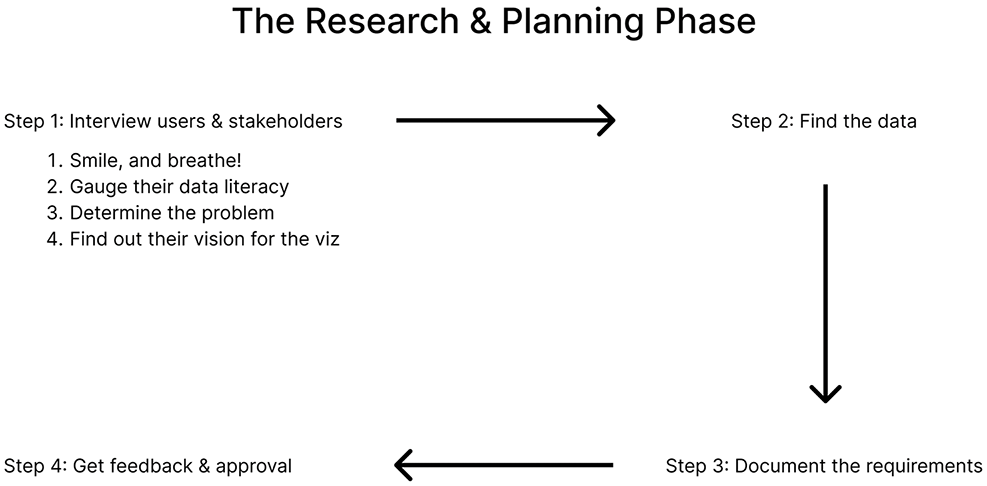
Use the research workflow to interview users, find data, document requirements, and obtain feedback and approval. section 8.2

