liveBook · Manning

Enum

As explained in Practical Automation with PowerShell: Effective scripting from the console to the cloud

An enumeration is a set of named constants, typically associated with underlying integral values.

An enum is a set of named constants mapped to integer values. It replaces obscure numeric arguments with readable names while preserving the values required by the underlying API. section 9.1.4

Use enums when automating APIs with predefined options:

  • Pass a fully qualified Office enum value, such as WdAutoFitBehavior::wdAutoFitContent, to an API method. section 9.1.4
  • Enumerate available values with GetEnumValues() instead of memorizing names or numeric assignments. section 9.1.4
  • Prefer ValidateSet for simple PowerShell parameters; enumeration sets suit more advanced APIs or data integration. section 7.3.1
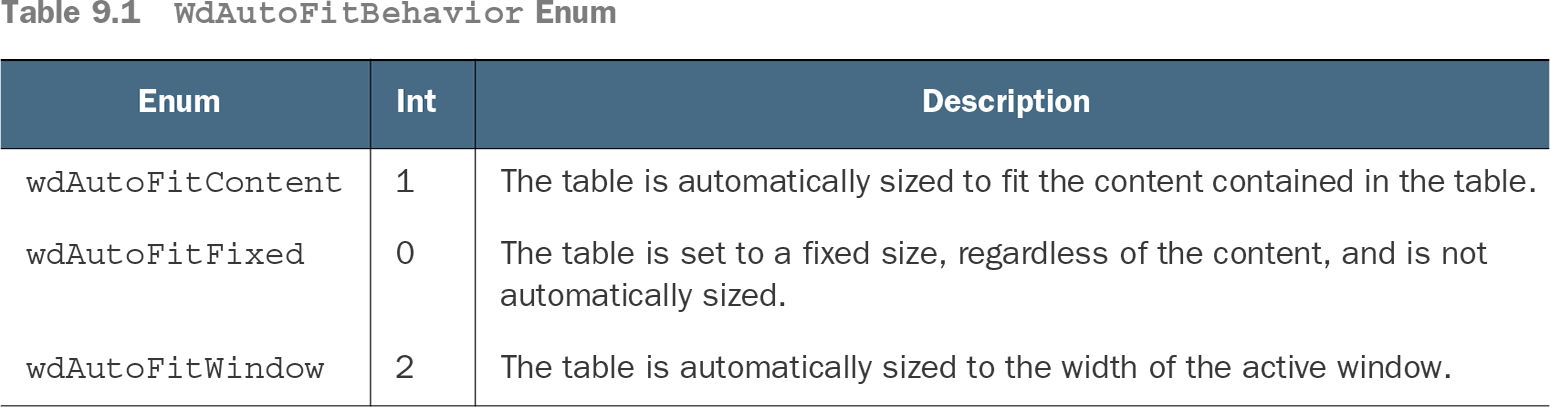
Table 9.1 WdAutoFitBehavior Enum (view table figure)

Enum

Int

Description

wdAutoFitContent

1

The table is automatically sized to fit the content contained in the table.

wdAutoFitFixed

0

The table is set to a fixed size, regardless of the content, and is not automatically sized.

wdAutoFitWindow

2

The table is automatically sized to the width of the active window.

Compare the three WdAutoFitBehavior choices with their integer values and table-sizing behavior. section 9.1.4

Adding a Word table

A table can use wdWord9TableBehavior and wdAutoFitContent as named arguments, then receive cell text through the returned table object. section 9.1.4


How Practical Automation with PowerShell: Effective scripting from the console to the cloud covers it

How deep it goes
Explains integer backing values, qualified syntax, value discovery, and API usage, while deferring custom enumeration design.
Examples
Demonstrates Word table auto-fit modes, GetEnumValues output, table creation, and constrained server-status parameters.
What it assumes
Assumes basic PowerShell and API usage, while defining enum names, integer backing values, and qualified access from the examples.
What you can do after
Apply it via PowerShell to select documented API behaviors and inspect valid enum values without relying on numeric codes.
How it connects
Connects named constants to integral values, Office Interop DLLs, API arguments, and ValidateSet parameter validation.

Also explained in

Compare how 23 books explain enum →

Related concepts

This explainer was generated by Manning's knowledge graph from the text of Practical Automation with PowerShell: Effective scripting from the console to the cloud. The section links point to the parts of the book it draws on.