An environment variable is a named value made available to a process through its execution environment. In Kubernetes, it passes application configuration or sensitive values into a container. section 4.2.5 section 4.2.4
Use environment variables to:
- Inject ConfigMap values such as application settings, log levels, or web-application configuration. section 4.2.4
- Inject Secret values through valueFrom and secretKeyRef rather than placing the value directly in the pod definition. section 4.2.5
- Repair a failing Deployment by identifying the required variable in container logs and adding it with kubectl edit or kubectl set env. section 8.1
Reference a Secret from a pod
Define a container variable with valueFrom.secretKeyRef, for example: env: - name: DEV_PASS valueFrom: secretKeyRef: name: dev-login key: username. After applying the manifest, verify the value with kubectl exec secret-env -- printenv DEV_USER DEV_PASS. section 4.2.5
Diagnose a missing database variable
When a MySQL pod enters CrashLoopBackOff, run kubectl logs to find the required password variable, then update the Deployment and confirm recovery with kubectl get po. section 8.1
Figure 4.22 You can pass the Secret data to a pod via environment variables. Set the command inside the container to print the environment variables (printenv). Don’t forget to change the c to -c.”
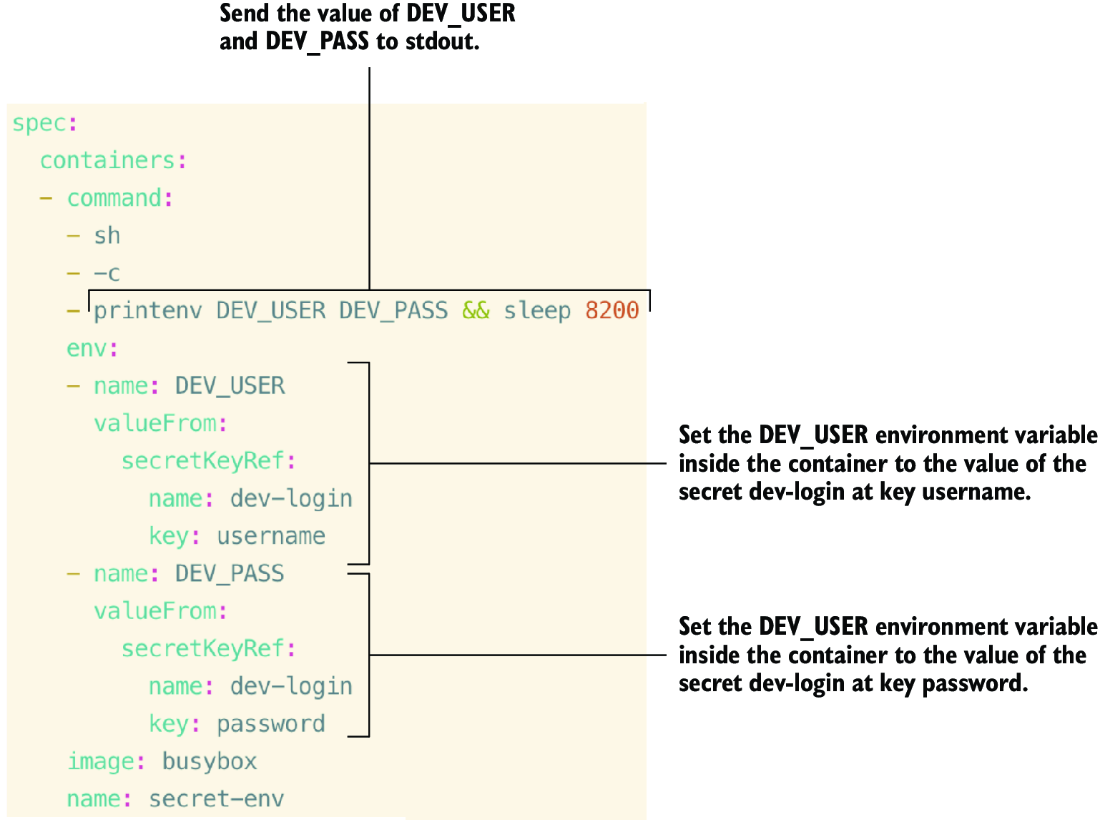
Shows a pod receiving Secret data through environment variables and printing the resulting values. section 4.2.5


















