An environment variable is a named configuration value supplied through a process or container environment. Containers and Kubernetes use environment variables to override instance-specific settings, such as unique identifiers, without rebuilding the application artifact. section 1.2.1
In Quarkus, environment variables provide a runtime configuration layer above application.properties. Configuration precedence is system properties first, environment variables second, and application.properties third. section 3.2.3
Map application configuration to environment variables by following these rules:
- Capitalize the property name. section 3.2.3
- Replace each dot delimiter with an underscore; for example, my.greeting becomes MY_GREETING. section 3.2.3
- Set the variable when starting the process or container so the same artifact can receive environment-specific values. section 1.2.1 section 3.2.3
Override a greeting in Dev mode
Run GREETING="Environment variable value" quarkus dev. With no system-property override, Quarkus uses this value instead of the greeting configured in application.properties. If -Dgreeting="System property value" is also supplied, the system property wins.
The Dev UI can display environment variables and system properties alongside application configuration. Editing a value there persists it to application.properties, but that file is not automatically translated into System.getenv(); application code should read configuration through the MicroProfile Config API. section 3.3.1
Figure 1.2 Visualizing the relationships between the application, container, and Kubernetes
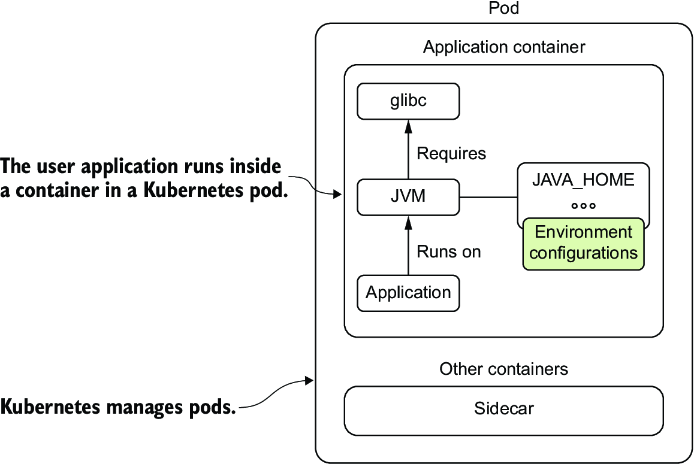
Use the application-container-Kubernetes relationship to trace where runtime configuration enters a deployed service. section 1.2.1


















