liveBook · Manning

Error output

As explained in 100 SQL Server Mistakes and How to Avoid Them

An error output is an SSIS component output that determines how rows affected by errors or truncations are handled.

Mistake: treating the default as harmless. An SSIS error output controls what happens when a row encounters an error or truncation; the default behavior fails the component instead of passing the row onward. section 6.1

Use the setting deliberately:

  • Distinguish general errors from data truncations; each can receive its own behavior. section 6.1
  • Keep failure behavior when one bad row should stop the data flow. section 6.1
  • Route rejected rows to an error output when the load must continue and failures need investigation. section 6.1

Record the failures

An error table can preserve the rejected value and diagnostic columns: CREATE TABLE staging.ImpressionLoadFailures ( FlatFileSourceErrorOutputColumn VARCHAR(MAX) NOT NULL, ErrorCode VARCHAR(MAX) NOT NULL, ErrorColumn VARCHAR(MAX) NOT NULL ); section 6.1

Figure 6.5 Flat file source editor—Error Output page set to ignore failure
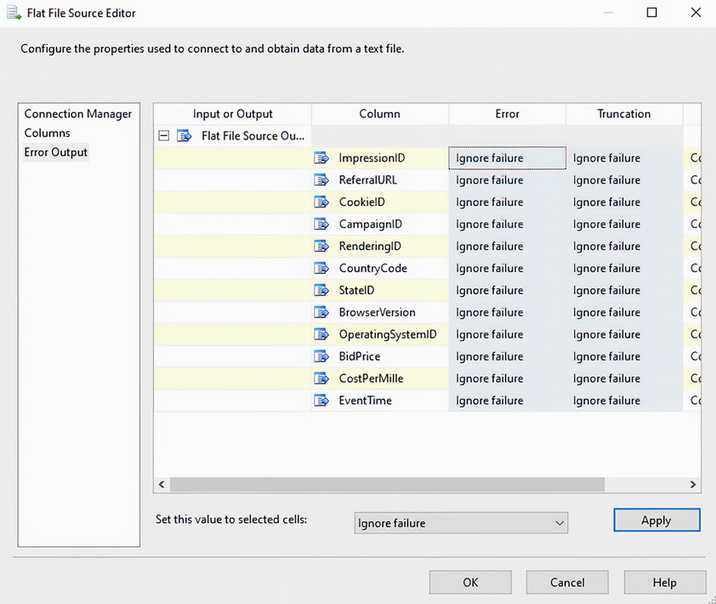
Inspect the Error Output page configured to ignore failure before choosing whether rejected rows should be captured elsewhere. section 6.1

How 100 SQL Server Mistakes and How to Avoid Them covers it

How deep it goes
Explains separate error and truncation behaviors, default failure, and error-table capture, but not deeper SSIS runtime internals.
Examples
Uses a flat file source, a failed data flow, an ignore-failure configuration, and a SQL error table.
What it assumes
Assumes familiarity with SSIS data-flow components, connection managers, and basic CREATE TABLE syntax.
What you can do after
Configure row-failure behavior and preserve diagnostic columns for rejected data.
How it connects
Connects error output with flat file sources, data flows, OLE DB destinations, and staging tables.

Related concepts

This explainer was generated by Manning's knowledge graph from the text of 100 SQL Server Mistakes and How to Avoid Them. The section links point to the parts of the book it draws on.