Exhaustive KNN is a practical Azure AI Search choice for small vector datasets. Configure it with cosine similarity when avoiding HNSW’s additional in-memory index structures matters more than optimizing searches across huge datasets. section 3.1
A production-minded setup includes:
- Set the vector field to 1,536 dimensions to match the generated OpenAI embeddings. section 3.1
- Select cosine similarity to compare embedding-vector direction rather than magnitude. section 3.1
- Disable retrieval for the vector field so searches do not return the full 1,536-element array. section 3.1
- Save the index carefully: Azure AI Search does not allow later edits after a configuration mistake, requiring a new index. section 3.1
Figure 3.2 A correctly set-up Azure AI Search Index. Make sure to set the Retrievable, Filterable, Sortable, Facetable, and Searchable columns exactly as shown in this image.
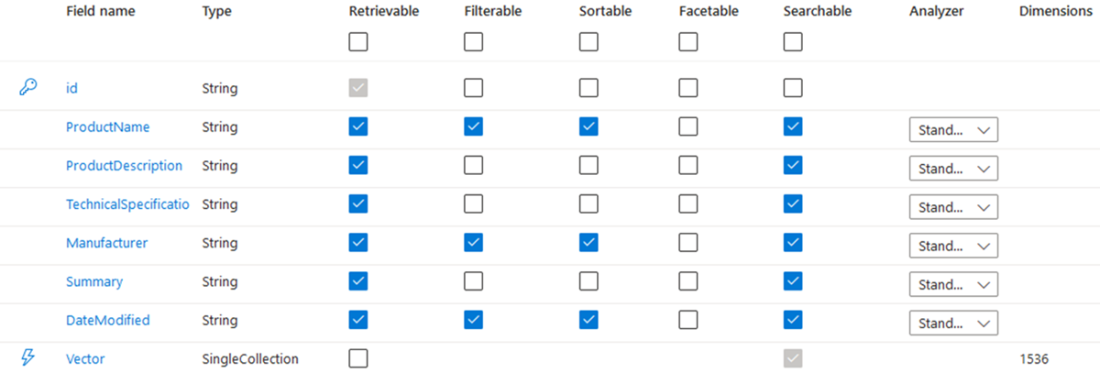
Use the correctly configured Azure AI Search index as a checklist for vector, retrieval, filtering, sorting, faceting, and search settings. section 3.1
