A vector search profile is an Azure AI Search configuration that defines how a vector field is searched. Configure it with Exhaustive KNN and cosine similarity when a small dataset favors predictable search without HNSW’s additional memory structures. section 3.1
Pair the profile with a vector field whose dimensions match the generated embeddings. The demonstrated setup uses 1,536 dimensions, disables retrieval of the large vector array, and keeps ordinary fields available for filtering, sorting, and text retrieval. section 3.1
Apply the profile as part of an index design workflow:
- Define fields for searchable text, structured filters, dates, and the vector representation. section 3.1
- Set vector dimensions to match the embedding model and choose cosine similarity for direction-based semantic comparison. section 3.1
- Choose Exhaustive KNN for smaller datasets; reserve HNSW’s faster large-scale search approach for cases that justify its additional index memory. section 3.1
- Validate settings before saving because Azure AI Search does not allow later index edits after a configuration mistake. section 3.1
The profile supports a broader retrieval pipeline: transform SQL records into concise searchable text, generate embeddings, upload both representations, and combine vector similarity with text or semantic search. Keep the index synchronized by updating modified records and removing deleted ones. section 3.4
Figure 3.2 A correctly set-up Azure AI Search Index. Make sure to set the Retrievable, Filterable, Sortable, Facetable, and Searchable columns exactly as shown in this image.
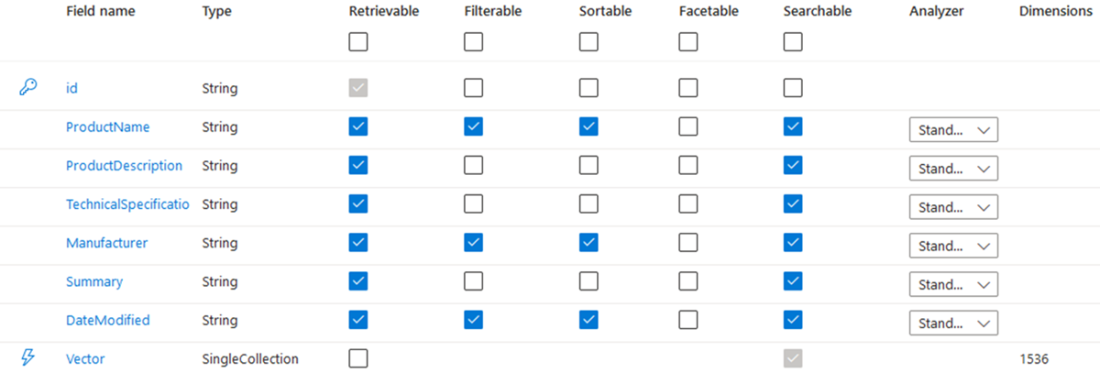
Use the index configuration figure to verify retrievable, filterable, sortable, facetable, and searchable settings before creating the index. section 3.1
