An external style sheet is a separate CSS file containing style rules. Traditionally, its filename ends in .css, such as styles.css. Attach it to a page with a link element in the head. section 7.4 section 7.7
Attach the stylesheet
For a CSS file beside the HTML page, write: <link href="styles.css" rel="stylesheet">. For a file in a css subdirectory, use <link href="css/styles.css" rel="stylesheet">. You can also reference a root-relative path or a remote URL. The older type="text/css" attribute is unnecessary in HTML5. section 7.4
External styles make a consistent look easier across multiple pages. Change one CSS file and every linked page receives the update, keeping structure and presentation more separate. section 7.4
Figure 7.3 The <link> tag syntax for attaching an external style sheet to a web page
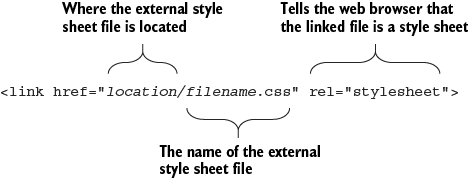
Use the link-element syntax figure to see how a page connects to an external CSS resource. section 7.4
External and internal author style sheets sit below inline styles in the cascade, so an inline declaration wins when both sources style the same element. section 19.13

