LLMAgent combines a backbone LLM with tools to execute tasks. Its run() method starts a processing loop that acts on the LLM’s planning and tool-call requests, then produces a TaskResult. section 4.0 section 4.1
The core interface and data structures are:
- LLMAgent(llm, tools, templates) holds the backbone LLM, a tool registry, and prompt templates. add_tool() registers a tool and rejects duplicate names. section 4.1.2
- Task contains an id_ and an instruction; TaskResult contains the corresponding task_id and result content. section 4.1
- run(task, max_steps) returns a TaskHandler, an asyncio.Future subclass. Await it for the result, or check done() and retrieve result() when complete. section 4.2.3 section 4.3
For each task, run() creates a TaskHandler and starts a background processing loop. get_next_step() returns either a TaskStep to execute with run_step() or a final TaskResult. The loop continues until completion, an irrecoverable error, or the configured maximum number of steps. section 4.2.3
The handler tracks a step counter and a rollout: a formatted history of each step’s chat messages and tool calls. During run_step(), tool requests are matched against the registry and executed; the resulting history is appended to the rollout for subsequent decisions. section 4.2.3
Figure 4.9 The process for executing tasks using the run() method. When a task is submitted, the helper TaskHandler is created to manage task execution on behalf of the LLMAgent.
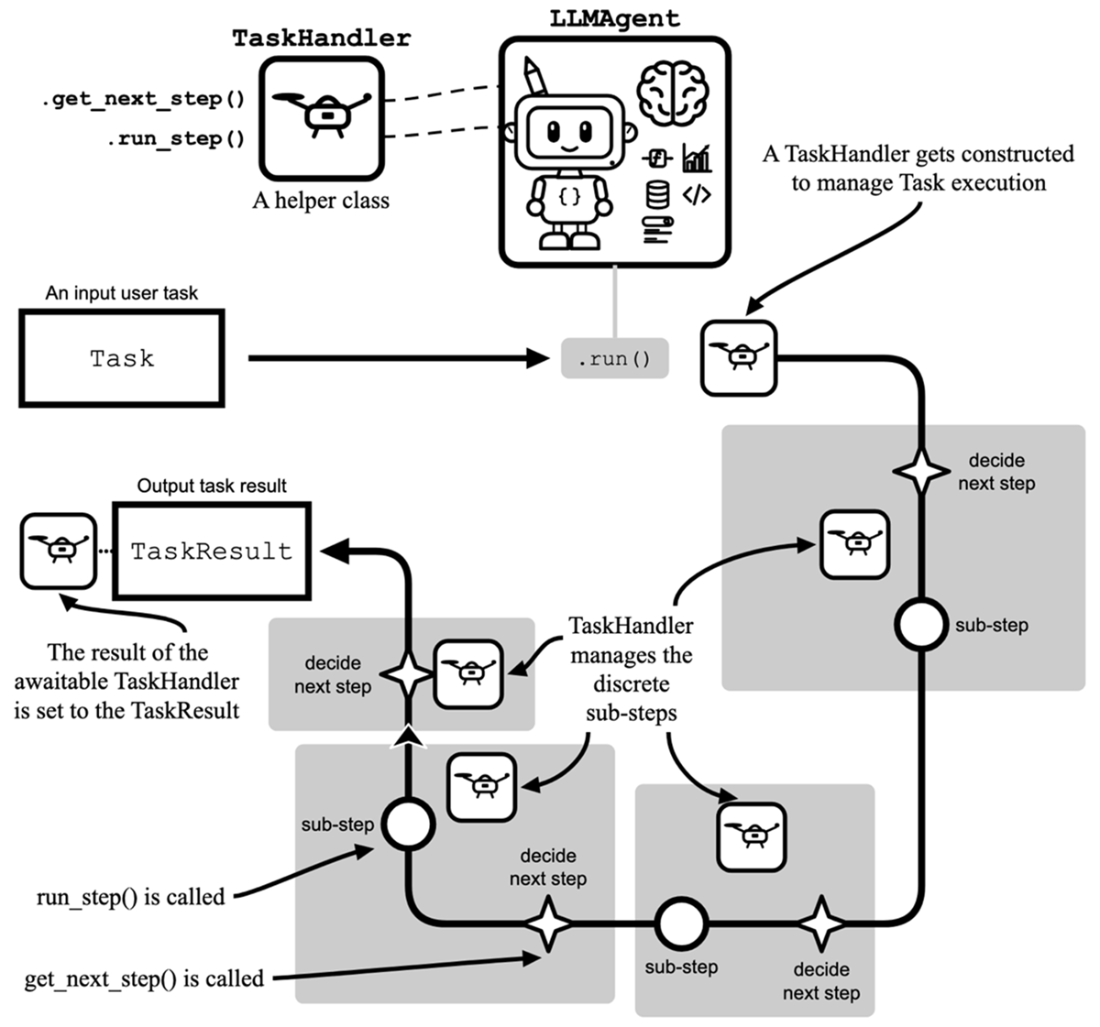
Follow how run() delegates a task to TaskHandler and cycles between planning and step execution. section 4.2.3
Generate a sequence
Wrap a next_number function in PydanticFunctionTool, construct an LLMAgent with the LLM and tool, and submit a Task starting at 4 with max_steps=5. The handler can return the sequence 4 → 2 → 1; inspecting handler.rollout reveals the individual tool calls. The tool’s generic name and description help discourage the LLM from relying on pretrained knowledge instead of calling it. section 4.3
The same execution interface supports further capabilities:
- Memory instances recall relevant episodes before execution and record an episode afterward. Recalled content is injected into the step’s system message; a failed recall can be skipped. section 7.5.2
- run(..., with_approval=True) asks a human to review a proposed result. Rejection feeds the operator’s feedback back into the loop as a new step. section 8.3.1
- run_supervised() returns a SupervisedTaskHandler so an operator can inspect and advance individual steps, then complete the task. section 8.4.2
- Subagent specifications are registered at construction and disclosed in the system message; UseSubAgentTool dispatches a subagent during a step. A parallel registry and tool enable dispatch to remote A2A agents. section 9.2.3 section 10.2.3
