A fallback font is the system or generic typeface displayed when a preferred web font is unavailable or still loading. It keeps text usable while the browser attempts to render the custom font. section 12.2 section 12.5.1
Web fonts can produce a Flash of Unstyled Text (FOUT): the fallback appears first, then the web font replaces it. Alternatively, a browser may hide the text temporarily, producing a Flash of Invisible Text (FOIT). Both behaviors can disrupt reading or leave a page blank if loading fails. section 12.5 section 12.5.1
Choose the loading behavior through font-display inside the @font-face rule:
- swap displays the fallback immediately and replaces it whenever the web font becomes available. section 12.5.1
- block hides text briefly, then falls back to unstyled text if loading takes too long. section 12.5.1
- fallback briefly hides text, shows the fallback if necessary, and later uses the web font when it loads. section 12.5.1
- optional may leave the fallback in place when a slow connection makes the web font too costly to wait for. section 12.5.1
Testing font loading
Set font-display: swap when text should remain visible, then throttle the network in Chrome or Firefox DevTools to observe loading behavior under slower conditions. section 12.5 section 12.5.1
Figure 12.14 FOUT—Flash of Unstyled Text
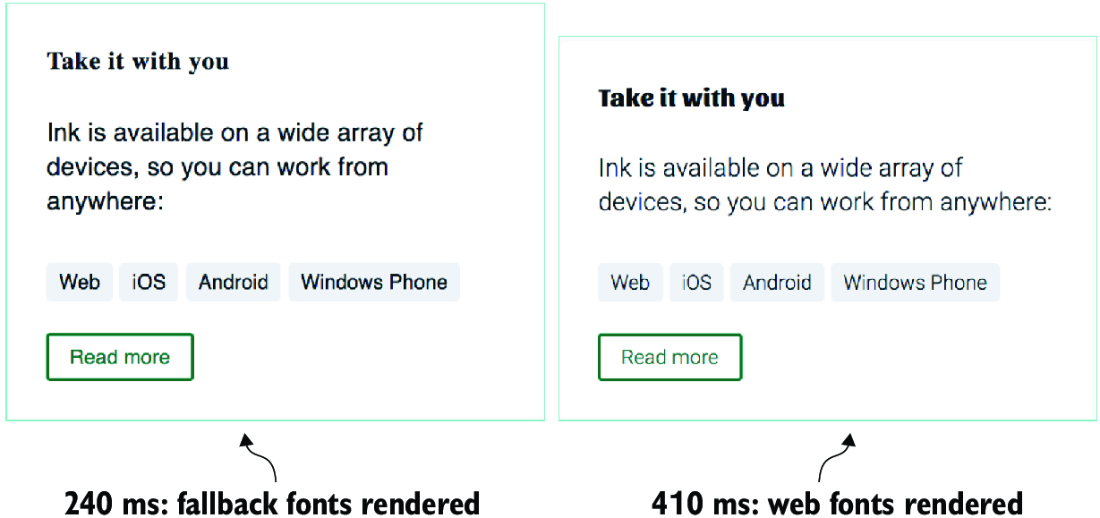
Compare the visible fallback text in FOUT with the layout and reading disruption caused by a delayed web font. section 12.5
