FOUT, or Flash of Unstyled Text, occurs when a browser displays fallback-font text before a web font loads. When the intended font renders, its different dimensions can shift the layout and interrupt reading. section 12.5
The browser’s font-loading choices create different visible trade-offs:
- FOUT displays the fallback font immediately, then replaces it with the web font when available. section 12.5.1
- FOIT keeps text invisible while the web font loads, preserving space but risking a blank, unusable page if loading is delayed or fails. section 12.5
- font-display: fallback briefly hides text before showing the fallback, while optional may leave the fallback in place on slower connections. section 12.5.1
Testing a font-loading choice
Throttle the network in Chrome or Firefox DevTools, reload a page using a web font, and observe whether fallback text appears immediately, disappears briefly, or remains invisible. This exposes layout shifts and delayed or failed font loading that a fast connection can conceal. section 12.5 section 12.5.1
Figure 12.14 FOUT—Flash of Unstyled Text
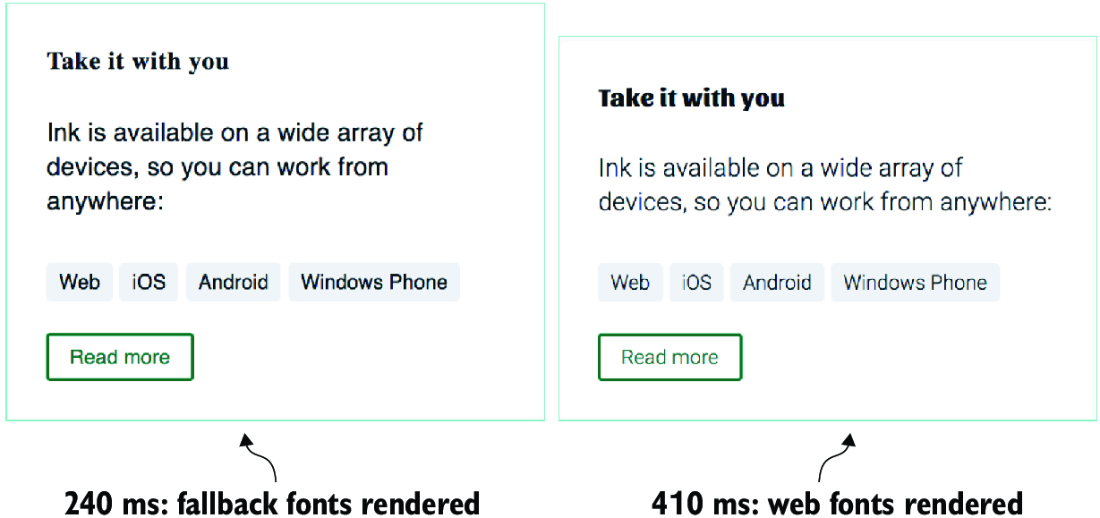
Use the figure to compare the initial fallback-font render with the later web-font render that produces the flash and possible layout shift. section 12.5
