In the CIELAB color space, b* is the blue–yellow dimension: a coordinate that places a color along an opposing blue-to-yellow axis. Negative b* values move toward blue; positive values move toward yellow; 0 sits between them. section 4.2.4
b* works alongside L* for lightness and a* for the red–green axis. Unlike a typical color-picker control, it is part of a device-independent color space, so the same coordinates define colors across print, monitors, and other media. section 4.2.4
Although b* can technically extend without bounds, values commonly fall between -128 and 127. Thinking in this direction-based way can make color adjustments less mysterious: shift one way for more blue, the other for more yellow. section 4.2.4
Holding lightness steady
A slice of CIELAB at L* = 75 shows colors at one fixed lightness while their a* and b* coordinates vary. Comparing it with a slice at L* = 25 separates changes in lightness from movement along the blue–yellow dimension. section 4.2.4
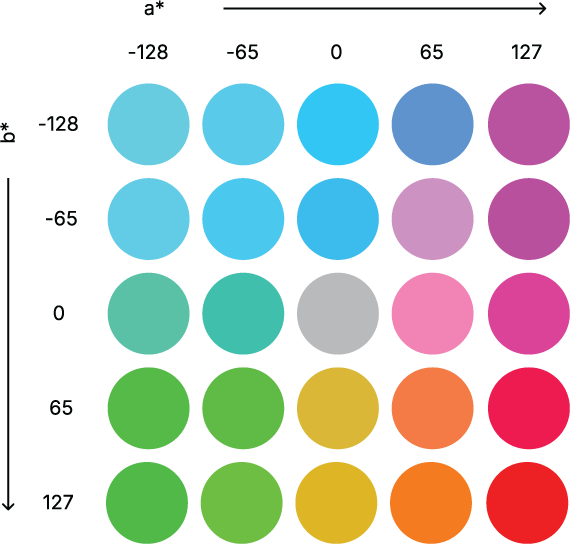
Explore a CIELAB slice at L* = 75 to see the blue–yellow direction within a fixed-lightness plane. section 4.2.4







