A Git repository stage is a Snowflake object that exposes repository files inside Snowflake. It lets data engineers fetch code from a Git host, browse branch paths, and execute staged SQL with EXECUTE IMMEDIATE FROM. It supports database change management and continuous integration by making committed repository code available to the Snowflake environment. section 15.3.1 section 15.7
Figure 15.3 Configuring Snowflake to use Git consists of creating a secret containing credentials that Snowflake uses to authenticate with the repository, an API integration with the Git repository API, and a Git repository stage that exposes the files in the repository to Snowflake.
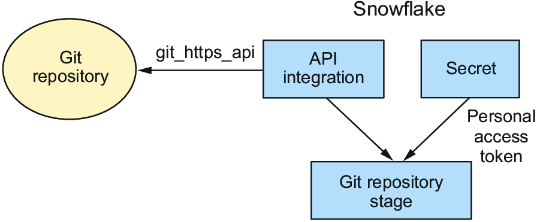
A Git repository stage depends on a credential secret and an API integration: the secret authenticates to the Git host, while the integration defines permitted API access. section 15.3.1
Create the stage only after choosing a database and schema to contain the integration objects. Store Git credentials in a secret, create an API integration using the git_https_api provider with allowed repository URL prefixes, grant use of that integration, and create the Git repository object with its origin URL. Fetch the repository before inspecting or executing its files. section 15.3.1 section 15.3.1
A practical setup and verification flow is:
- Create a database and schema for the Git integration objects. section 15.3.1
- Create a password-type secret containing the Git account username and password or personal access token. section 15.3.1
- Create and enable an API integration, restrict its allowed prefixes to the Git account URL, and allow the credential secret. section 15.3.1
- Create the Git repository object with the API integration, credentials, and repository origin; then run ALTER GIT REPOSITORY ... FETCH. section 15.3.1
- Use SHOW GIT BRANCHES and LS with a branch path such as @SF_DE/branches/main to confirm that fetched files are visible. section 15.3.1
Execute a committed RBAC script
After fetching the latest repository changes, execute a script directly from its branch path: EXECUTE IMMEDIATE FROM @SF_DE/branches/main/Chapter_15/Chapter_15_Part2_RBAC.sql. Grant USAGE on the Git repository stage to the role that must read it; a DATA_ENGINEER role can then list the repository files. Fetching immediately before execution is recommended so another engineer’s merged changes are included. section 15.3.2 section 15.3.2
Use local files during development and the Git repository stage after code is committed and merged. Snowflake CLI can run an individual local script with snow sql -f, then fetch the staged repository and issue EXECUTE IMMEDIATE FROM through snow sql -q. This preserves a workflow in which scripts are tested individually before staged execution creates or changes database objects. section 15.4.2 section 15.4.2
Run a staged object-creation script with Snowflake CLI
Fetch with snow sql -q "alter git repository ADMIN_DB.GIT_INTEGRATION.SF_DE fetch". Then execute a committed script by passing EXECUTE IMMEDIATE FROM and its fully qualified stage path to snow sql -q. The illustrated script creates the JSON_ORDERS_TBL_STG table. section 15.4.2 section 15.4.2
