FewShotPromptTemplate constructs structured prompts by combining reusable input-output examples with instructions and a task-specific input. Few-shot examples help language models follow the intended context, response format, and interaction pattern. section 6.1.1
Configure the prompt from five coordinated parts:
- examples: reference question-answer pairs. section 6.1.1
- examplePrompt: a PromptTemplate that formats each example, such as Question: {question} and Answer: {answer}. section 6.1.1
- prefix: instructions placed before the examples; suffix: the concluding task, commonly Question: {input}. section 6.1.1
- inputVariables: values supplied when formatting the completed prompt. section 6.1.1
Create and inspect a few-shot prompt
const examplePrompt = PromptTemplate.fromTemplate("Question: {question}\nAnswer: {answer}"); const prompt = new FewShotPromptTemplate({ examples, examplePrompt, prefix, suffix: "Question: {input}", inputVariables: ["input"], }); const formatted = await prompt.format("How should I respond?"); console.log(formatted); section 6.1.1
Figure 6.2 The FewShotPromptTemplate class takes five key parameters: examples (a list of question-answer pairs serving as reference examples), examplePrompt (a template for formatting each example), prefix (introductory text preceding the examples), suffix (concluding text following the examples, typically containing the main task or question), and inputVariables (specifying the variables to be provided when the prompt is used).
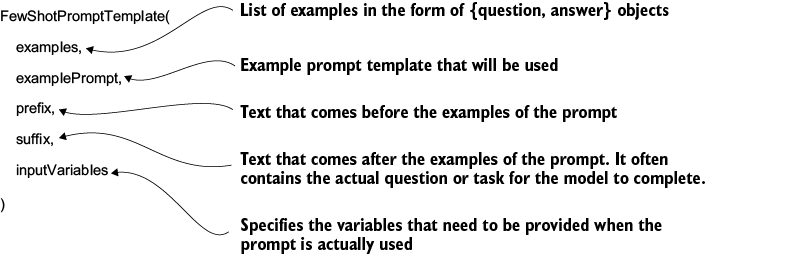
Use the parameter overview to verify how examples, formatting, instructions, suffix text, and runtime variables combine. section 6.1.1
