F# uses a deliberate order for files and declarations. That order determines which code is available during compilation and makes dependencies easier to follow instead of allowing circular, spaghetti-like relationships. section 6.2.3 section 3.2.4
Place low-level, independent files first and files that consume them later. For example, a database-access file such as Db.fs can precede higher-level code, while Program.fs is placed last because it uses declarations from the other files. section 6.2.3
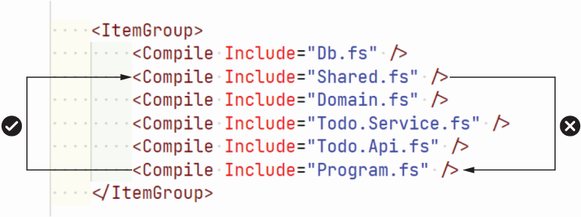
A project-file view makes the compilation order visible: the final file can access declarations from the files above it. section 6.2.3
Do not confuse display order with compilation order. VS Code’s standard explorer sorts files alphabetically, whereas Ionide provides a panel showing the logical order defined by the project file. section 6.2.3
Use ordering as a practical development aid:
- Read dependencies downward through the project: later files can use earlier declarations. section 6.2.3
- When many compiler errors appear, fix the first error in the first file before addressing downstream messages. section 3.2.4
- Use temporary type annotations when inference obscures the location of the original problem, then remove them after correcting the error. section 3.2.4
A small application
Define a Car module and its drive function in an earlier file, then call it from Program.fs: `let remaining = Car.drive 2 8` followed by `printfn $"You have {remaining} gas left."`. The ordering makes the function available where it is used. section 6.2.3
