An F# project file is the configuration file that describes an application or reusable library and lists the F# files included in compilation. Unlike platforms that automatically compile every file in a directory, F# requires an explicit file list. section 2.4.2
The file list also defines dependency order. A file can access declarations in files listed before it, but not files listed later. Put independent, low-level files first and usually place Program.fs last, where it can combine the rest of the application. section 6.2.3
When working with an F# project file:
- Add every application file explicitly; creating Car.fs does not make it part of the compilation automatically. section 6.2.3
- Use VS Code's F#: Add Current File to Project command to add the current file through the editor. section 6.2.3
- Read the project order rather than relying on VS Code's alphabetical file explorer; Ionide can show the logical compilation order. section 6.2.3
Adding a module to DrivingApp
After creating Car.fs and defining a Car module, add the file to DrivingApp.fsproj. The project then contains an entry such as <Compile Include="Car.fs" />. If Program.fs calls Car.drive, keep Car.fs earlier in the project list and Program.fs later. section 6.2.3
Figure 6.6 The F# Solution Explorer in Ionide shows the logical file order as defined within the project file, not the alphabetical file order.
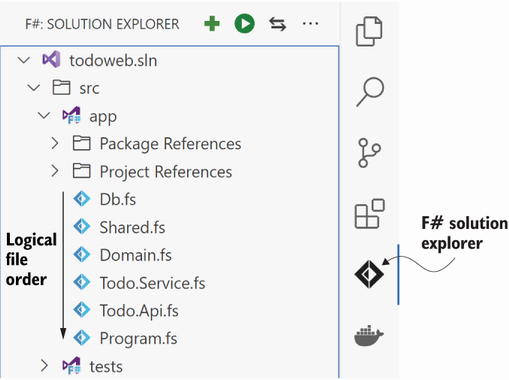
Ionide's Solution Explorer makes the project-defined compilation order visible, helping distinguish dependency order from alphabetical folder order. section 6.2.3
