File-system-based routing maps an application's folders and files to its URL structure. In a Next.js application, folders inside src/app become route segments, while page.js makes a segment publicly accessible. section 2.8.1
Use the app directory to organize routes and supporting application code:
- Place app/page.js at the root to define the index route (/), and app/blog/page.js to define /blog. section 2.8.1
- Represent a dynamic URL segment with brackets, such as app/blog/[post]/page.js; Next.js passes the captured value through the params prop. section 2.8.1
- Keep reusable UI in components, custom React logic in hooks, and utilities in lib, alongside route files in app. section 2.8.1
- Use layout.js files to wrap route content. The root layout supplies the required html and body elements, while nested layouts add section-specific UI. section 2.8.5
Dynamic blog route
Create app/blog/[post]/page.js to serve URLs such as /blog/my-first-post or /blog/welcome-message. The page receives params such as { slug: "my-first-post" }, allowing the React component to use the captured URL value. section 2.8.1
Figure 2.9 File-based routing in Next.js. The root page.js in the app corresponds to the index page (/). The blog page.js in the blog folder corresponds to the blog path (/blog). Finally, the route segment that corresponds to individual articles (wrapped in brackets [ ]) corresponds to the blog post path (/blog/hello).
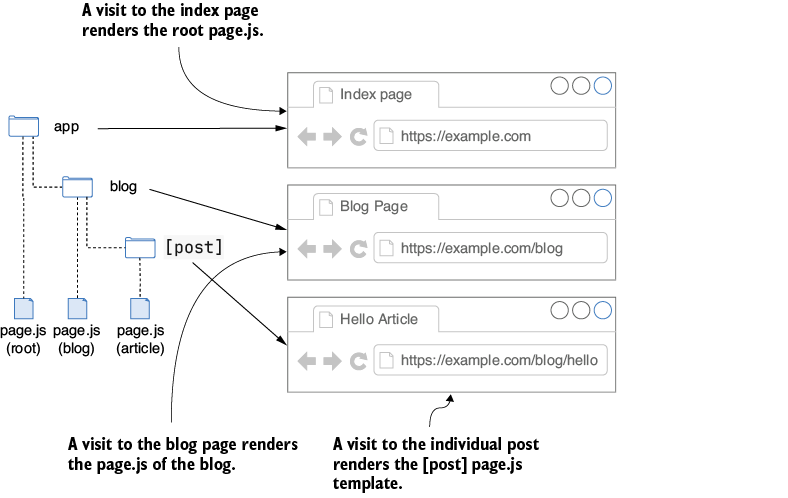
Browse the route diagram to compare the root page, blog page, and bracketed article segment with their generated URLs. section 2.8.1
Figure 2.10 This diagram shows nested layouts in Next.js. The root layout wraps all content, while the blog layout adds elements specific to the blog section. Individual blog posts are inherited from both.
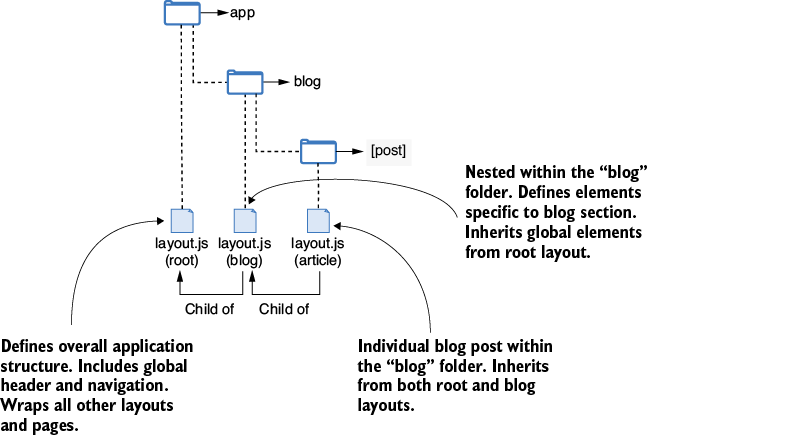
Browse the nested-layout diagram to see how the root layout wraps all content and the blog layout adds section-specific elements. section 2.8.5

