The SVG fill attribute paints the interior of a shape. Most SVG shapes start with a black fill; set fill to a CSS color to change it. Use fill="none" when a shape should show only its stroke. Fill-related opacity can make the interior semitransparent. section 1.2.2
Fill can be supplied three ways: as an SVG attribute, as an inline style, or from an external CSS stylesheet. D3’s attr() sets the attribute, while style() sets an inline style. Choose a consistent approach when possible so the code that creates shapes stays separate from the code that controls their appearance. section 2.6 section 2.5
Use fill with SVG shapes as follows:
- Set an attribute directly with .attr("fill", "turquoise") when creating a selected SVG element. section 2.5
- Set an inline CSS value with .style("fill", "plum") when styling a D3 selection. section 2.6
- Set fill in an external stylesheet, such as rect { fill: orange; }, to keep presentation rules in CSS. section 2.6
- Add stroke separately when a visible border is needed; a fill alone does not create one. section 1.2.2
Coloring a D3 rectangle
After positioning and sizing a rectangle, add fill as a string. The rectangle becomes visible with a turquoise interior. svg .append("rect") .attr("x", 10) .attr("y", 10) .attr("width", 414) .attr("height", 16) .attr("fill", "turquoise"); section 2.5
Figure 2.18 Fill applied as an attribute, from an external stylesheet, and as an inline style
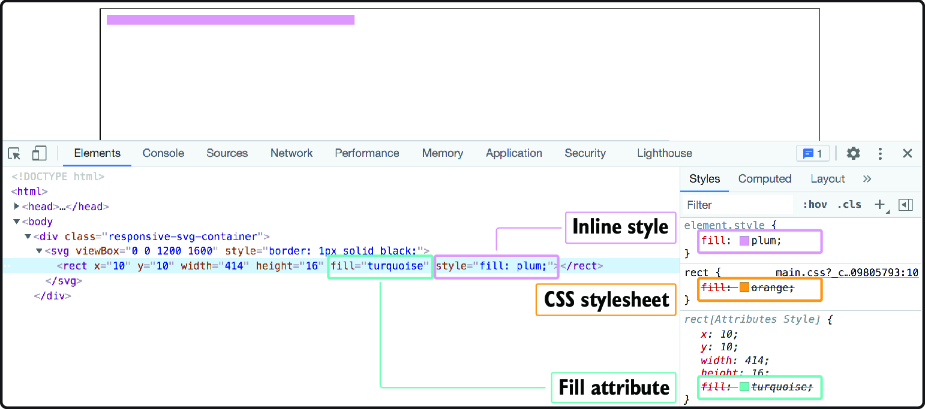
Compare the same rectangle styled by an SVG attribute, an inline style, and an external stylesheet. The inline fill wins over the other two in this demonstration. section 2.6
