CSS Grid can provide the structural grid behind a responsive interface: columns, rows, and gaps organize where content sits and how its edges align. Rather than treating a grid as a rigid page layout, use it as a consistent set of dimensions that lets content span different widths while preserving balance and visual order. section 6.2.1 section 6.0
Start with content structure, not decoration. Identify page sections such as the header, main content, and footer; then choose a container width, columns, and gutters to organize the content inside them. A shared grid can make pages with different layouts feel related, while similar page types should retain a consistent structure to avoid confusion. section 6.6 section 6.2.2
Use a grid to make practical layout decisions:
- Choose a maximum container width so content has a clear outer edge and does not run indefinitely across large screens. section 6.2.2
- Create more underlying columns than visible content columns, so one component can span several columns and another can occupy fewer. section 6.2.2
- Vary column arrangements between homepage sections to group related content and help the eye move through the page. section 6.3.2
- Keep text readable and controls easy to tap as screens narrow; stack or simplify sections instead of merely shrinking the desktop arrangement. section 10.9.2
Turning a desktop grid into a mobile layout
A desktop design can use 12 columns to align a hero search bar, benefit tiles, and carousel controls even when each section has a different content width. On a 360px phone viewport, group the 12 columns into four larger columns, enlarge the search bar, and stack three-column content. The result prioritizes a thumb-friendly search task instead of compressing the original layout into an unusable small screen. section 10.3 section 10.9.2
Figure 6.6 This grid has a maximum width of 1200 pixels with a margin of 22 pixels on the left and right; columns are 127 pixels wide, and the remaining grid gaps between columns are 20 pixels.
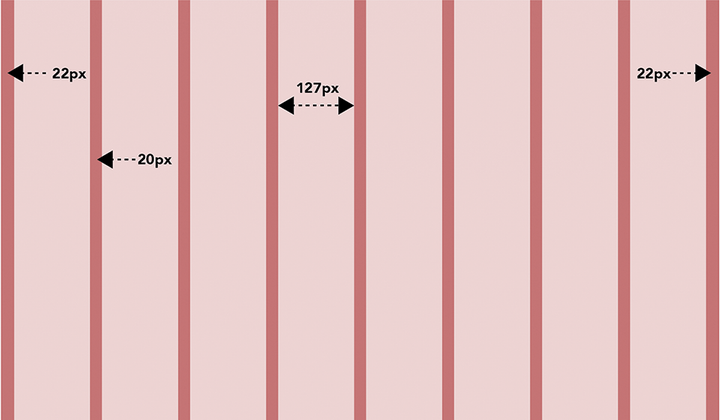
Inspect a concrete grid calculation: a 1200px container, eight columns, 22px outer margins, 127px columns, and 20px gaps. section 6.2.2
CSS Grid and Flexbox reduce the extra code once needed for responsive multi-column layouts. Their value is not only technical: flexible layout choices let a design establish hierarchy, separate content groups, and adapt across devices without being confined to a plug-and-play framework. section 6.3.2 section 6.0




