The float property pulls an element to the left or right edge of its container, removes it from normal flow, and lets surrounding inline content wrap around its margin box. Its vertical position still depends on where the element appears in the HTML. section 14.4.1
Use these rules to predict the rendered result:
- Apply float: left or float: right to choose the edge around which content flows. section 14.4.1
- Place the floated element where the wrap should begin; floating does not move it upward or downward from that source location. section 14.4.1
- Float multiple elements in the same direction to stack them alongside one another. section 14.4.1
- Account for a float extending beyond its original container, and clear it when later content must stop wrapping around it. section 14.4.1
Wrap poem text around an image
Place an image inside a .poem-image wrapper, then apply float: left and a right margin. The poem’s inline text flows beside the 350-pixel image, producing a newspaper-like layout. The wrapper is optional, but using a normal element can make shapes more predictable than applying them directly to an image. section 14.4.1
Listing 14.14 Floating the image to the left
.poem-image {
  float: left;
  margin-right: 15px;
}

.poem-image > img {
  display: block;
  height: 350px;
  width: 350px;
  object-fit: cover;
}
Inspect the compact CSS listing for the floated image, including direction, spacing, display mode, and dimensions. section 14.4.1
Figure 14.12 Defining a shape causes inline content to flow around the contours of the shape.
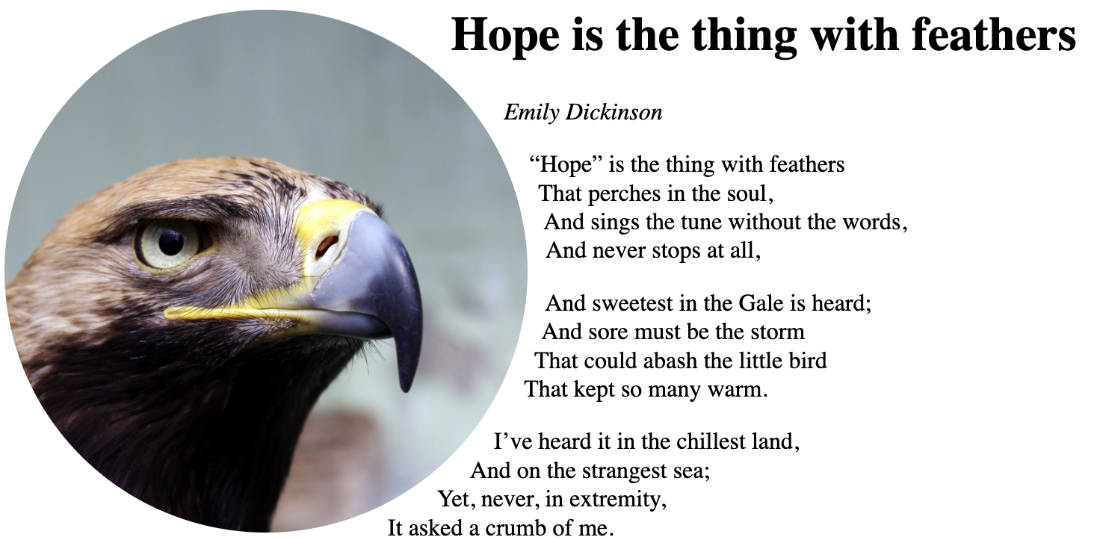
Compare ordinary rectangular wrapping with shape-based wrapping when a float is combined with shape-outside. section 14.4




