A keyboard user should not have to hunt for the next control. If focus jumps around the screen while someone tabs through a coursework upload or checkout form, they can lose their place and struggle to finish. Focus order is the sequence in which interactive elements receive keyboard focus. It should preserve the page’s meaning and follow a path that makes sense to its intended users. section 5.3.2
Use Tab and Shift+Tab to follow that path. Navigation links should ordinarily receive focus in sequence; form fields should follow the form’s meaning and expected operation. Visual expectations vary: an English-language layout may flow left to right and top to bottom, while an Arabic-language layout may suggest a different direction. There can be more than one sensible order. The test is whether the sequence feels predictable rather than random. section 5.3.2 section 6.1.5
Figure 5.5 Focus order can seem illogical if elements are moved around using CSS rather than having the tabbing sequence match the underlying DOM structure. This image shows the tab sequence starting from the right-most element, and then skipping to the first.
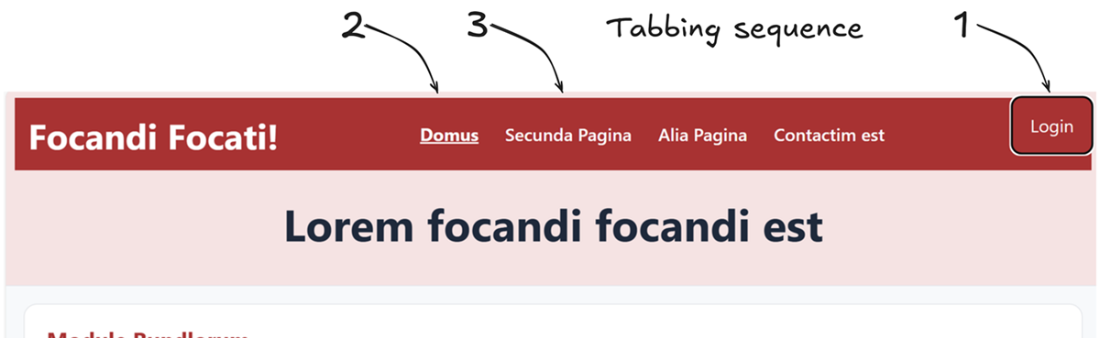
A link moved to the right with CSS can still receive focus first because its position in the underlying HTML has not changed. The illustrated jump from the rightmost element back to the first shows why a visually tidy header can feel disordered when tabbing. Check the keyboard sequence after changing a layout, not just its appearance. section 5.3.2
TIP: Try completing the task without a mouse. Can you reach every link, button, and field in a sensible sequence, see which one has focus, and move away from it? Native HTML form controls provide much of the expected keyboard behavior; custom validation and dynamic interactions need closer attention. After a form submission fails, moving focus to the first field in error helps the user begin fixing it. section 5.3 section 6.1.5
NOTE: A modal dialog changes the path. While it is open, focus should remain inside it rather than move to unavailable background content; when it closes, focus should return to the action that opened it. Focus order is therefore not only a page-layout decision: it must continue to make sense as an interaction unfolds. section 5.3 section 5.3.2
