A font family is a set of related styles built around one typeface: variations in weight, spacing, italics, or even serif treatment that still belong under the same visual umbrella. In strict terminology, the typeface is the underlying letter design, while a font combines that design with choices such as weight, size, and italics. In everyday design conversation, though, the terms often overlap. section 5.1.2 section 5.2.3
Using one family gives text a shared visual voice while leaving room for useful differences. A plain body style can carry most of the information; a bolder, larger, thinner, italic, or serif-related family member can set off a title. Because the styles are related, the contrast can guide attention without making the design feel as if several unrelated type choices wandered in from a pizza box. section 5.2.3 section 5.4.2
Start with restraint, then add contrast only where it earns its keep:
- Begin with a single font, size, and color to test whether the information remains clear and readable. section 5.2.3
- Use white space, lighter color, or a bold treatment before adding many separate font choices. section 5.2.3
- Make a header or title the first candidate for a contrasting family style, such as a bolder weight or serif counterpart. section 5.2.3
- Pair changes in typeface, weight, or case with size sparingly: combined form contrasts attract attention quickly. section 5.4.2
A small, harmonious contrast
Set a chart’s ordinary labels in a sans serif Roboto style, then use Roboto Serif for the title at a slightly larger size. The title separates itself from the supporting text, yet the shared family keeps the two treatments visually compatible. A smaller annotation can also stand apart simply by being different from surrounding text. section 5.2.3
Family choice is also a tone choice. Readers learn familiar letter shapes early, so small changes to curves, edges, proportions, and the way characters occupy space can accumulate into a feeling: rounded sans serif designs may seem open and friendly, while crisper forms can feel more restrained or impersonal. These cues are subtle, but they shape the personality carried by a visualization before anyone consciously names them. section 5.3
Figure 5.18 Instead of using a bolded sans serif font on the title, we changed it to the serif version of Roboto, Roboto Serif, in regular weight and made it just a smidge larger. Notice how it contrasts with the rest of the text by only a little, just enough to set it apart, but because we stayed within the Roboto family, the two styles blend harmoniously.
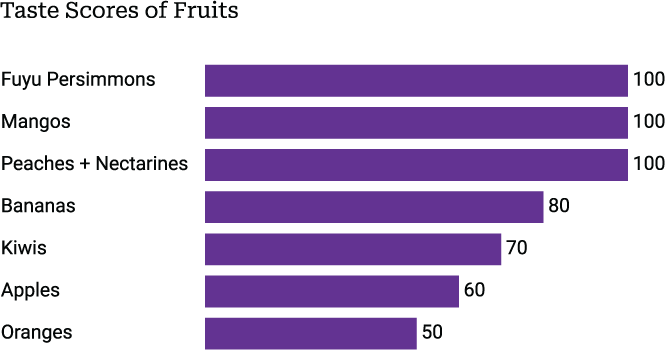
Compare a serif title with sans serif supporting text from the same family to see how modest contrast can separate roles while preserving harmony. section 5.2.3


