The CSS font-family property chooses the typeface used to draw an element’s text. Think of it as giving text a wardrobe: a clean sans-serif outfit for body copy, a traditional serif look for a large heading, or monospace for code. A typeface is the design itself; size, weight, and style further shape how that design appears. section 4.2 section 4.32
| Serif —A serif (rhymes with sheriff) typeface contains fine cross strokes (called feet) at the extremities of each character. These subtle appendages give the typeface a traditional, classy look, but they can get lost when displayed on a screen at small sizes. | 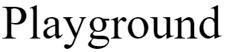 |
| Sans serif —A sans-serif typeface doesn't contain cross strokes on the extremities of characters. These typefaces usually have a clean, modern look that’s well suited to screen text, particularly at small sizes. |  |
| Monospace —A monospace typeface (also called a fixed-width typeface) uses the same amount of space for each character, so skinny letters such as i and l take up as much space as wider letters such as m and w. | 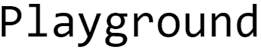 |
| Cursive —The cursive typefaces are designed to resemble handwritten pen or brush writing. |  |
| Fantasy —Fantasy typefaces usually are fanciful designs that have some extreme elements (such as being extra-thick). |  |
Typeface families are broad visual categories. Serif has small finishing strokes; sans serif is clean and screen-friendly; monospace gives every character equal width; cursive resembles handwriting; fantasy is for special effects. section 4.2
Start simply with a generic family. Modern browsers implement five generic choices: serif, sans-serif, monospace, cursive, and fantasy. Generic families are useful when you want a dependable style without asking for one particular installed typeface. section 4.3 section 4.32
Choose heading and paragraph families
Use a selector, then give font-family a value: h3 { font-family: sans-serif; } p { font-family: serif; } Here, h3 text receives the sans-serif generic family and paragraph text receives the serif generic family. On screens, serif is suited to larger text such as headings, while sans serif works well for body text. section 4.2 section 4.3
You can also name a system font installed on a visitor’s computer. Put quotation marks around a name containing spaces, numbers, or punctuation other than a hyphen. Capitalizing font names is optional, but makes the rule easier to read. section 4.6
Add a fallback stack
font-family: "Times New Roman", Georgia, serif; A comma-separated list is a font stack. The browser tries each family from left to right and uses the first installed system font. Finish with a similar generic family, because visitors may not have either named font. section 4.6 section 18.2
font-family: "League Spartan", Futura, Tahoma, sans-serif;
A stack can move from a preferred font to close alternatives and end with a matching generic family: "League Spartan", Futura, Tahoma, sans-serif. section 18.2
Web fonts work with the same property after the font is made available. A hosted-font service can provide a link that loads a font, then a rule such as p { font-family: Lato, sans-serif; } applies it. Self-hosted fonts use @font-face to assign a family name, which font-family can then use. Load only the font styles you need, since extra fonts can slow page loading. section 18.6 section 18.9
Play with one heading, one paragraph, and one code-like list: give each an appropriate generic family first, then replace one generic value with a small font stack. Keep the generic fallback at the end so the text still has a sensible look when preferred fonts are unavailable. section 4.2 section 18.2


