A force-directed layout positions visual elements through a real-time simulation of competing forces. Unlike preprocessing layouts, it continuously updates positions while rendering, letting positioning, collision, centering, many-body, and link forces shape the result. section 12.4 section 12.5
Control the layout by combining forces with distinct jobs:
- Positioning forces pull nodes toward target coordinates and can form clusters. section 12.5
- Collision forces maintain minimum distances and prevent overlapping nodes. section 12.5
- Centering forces move an entire cluster toward a chosen position. section 12.5
- Many-body forces model attraction or repulsion, while link forces pull connected nodes together. section 12.5
- Custom forces can keep nodes inside a specified area. section 12.5
Clustering paintings around month axes
A Svelte visualization represents Van Gogh’s paintings as circles grouped by year and month. Each circle starts at its month-axis position; D3’s forceSimulation(), forceX(), forceY(), and forceCollide() then separate overlapping circles while retaining those targets. A tick handler reads the updated node positions and renders the circles with their scaled radii and subject colors. section 14.5.2 section 14.5.2
Figure 14.12 Each painting created by Van Gogh will be represented by a circle. Those circles will be positioned on the small multiple visualization corresponding to their year of creation, clustered at the tip of the month axes. We’ll use D3’s force layout to create those clusters.
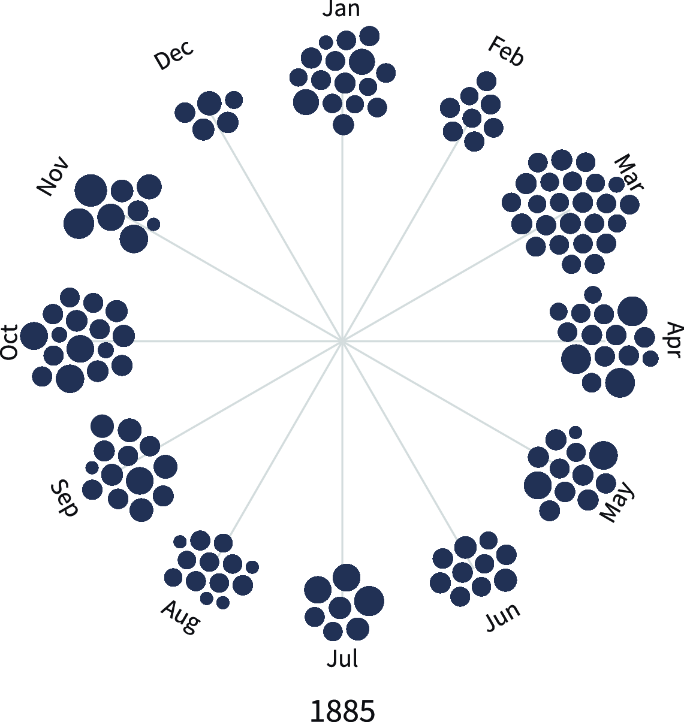
Use the figure to see how painting circles cluster at the tips of month axes within the small-multiple visualization. section 14.5.2


