liveBook · Manning

forceY

As explained in D3.js in Action, Third Edition

d3.forceY() creates a D3 force that attracts nodes toward a specified vertical position.

forceY() is a positioning force for a D3 force simulation. It draws nodes toward a chosen vertical position, leaving them free to spread along the x-axis. section 12.4.1

Align nodes into a horizontal band

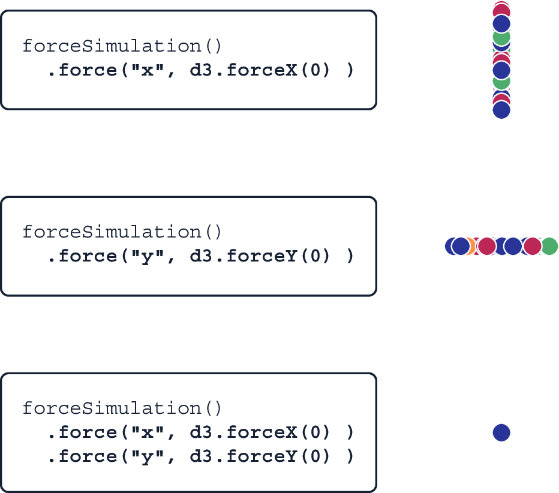
Use forceY(0) to pull nodes toward y = 0. Combined with a collision force, the nodes avoid overlap and form a flattened beeswarm-like shape. section 12.4.1

Control the pull with strength(). Its default is 1; lowering the y-force strength makes vertical attraction weaker. Combine forceY() with forceX() when nodes should be attracted toward both coordinates. section 12.4.1

Figure 12.11 d3.forceX() makes the nodes move toward a specific horizontal position, while d3.forceY() does the same with a vertical position.
figure

Compare horizontal and vertical positioning: forceY() targets a y-coordinate, the vertical counterpart to forceX(). section 12.4.1

How D3.js in Action, Third Edition covers it

How deep it goes
Explains target positions and strength through force-simulation outcomes, without detailing force internals.
Examples
Demonstrates y = 0 alignment and beeswarm-like plots, including character nodes sized and colored by data.
What you can do after
Apply it via D3 to vertically align simulation nodes and tune their attraction with strength().
How it connects
Connects forceY() to forceSimulation(), forceX(), strength(), and forceCollide().

Related concepts

This explainer was generated by Manning's knowledge graph from the text of D3.js in Action, Third Edition. The section links point to the parts of the book it draws on.