d3.forceX() is a positioning force for a D3 force simulation. It attracts each node toward a horizontal target, so nodes settle around a chosen x-coordinate while remaining free to move vertically. section 12.4.1
Pass 0 to pull nodes toward the vertical center line. Combine it with d3.forceY() to target a coordinate; using both at 0 pulls nodes toward (0, 0). section 12.4.1
Control the resulting layout with:
- strength(), which defaults to 1. A weaker x-force produces looser horizontal attraction than the y-force. section 12.4.1
- A point-scale value as the target, which creates separate horizontal groups for categories. section 12.4.1
- d3.forceCollide(), which prevents overlap and can turn a positioned node set into a beeswarm-like chart. section 12.4.1
Position values along an x-scale
Use forceX(d => xScale(d.value)) to pull each node to its value's horizontal position. Pair it with forceY(0) and a collision force so the nodes spread without overlapping. section 12.4.1
Figure 12.13 We can use positioning forces to create clusters. By passing the value returned by a point scale to forceX() or forceY(), we create a distinct group for each house.
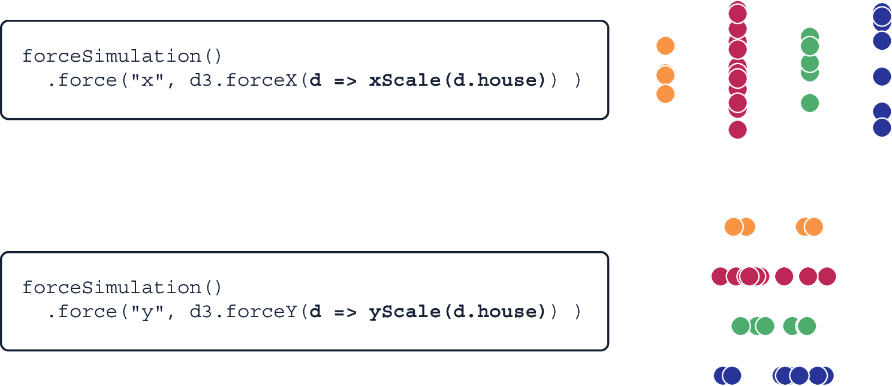
Shows category clusters created by passing point-scale positions to a positioning force. section 12.4.1
