A force simulation iteratively calculates node positions and velocities under named forces. On every tick, use the simulation’s x and y values to redraw SVG elements; it stops after the layout converges. section 12.4.1
Figure 12.9 When running a force layout simulation, D3 makes a series of real-time ticks, or iterations, where it calculates the position and velocity of each node according to the bound forces. We can then update the nodes’ positions in the tick’s callback function. The simulation stops once an optimal position has been found for each node.
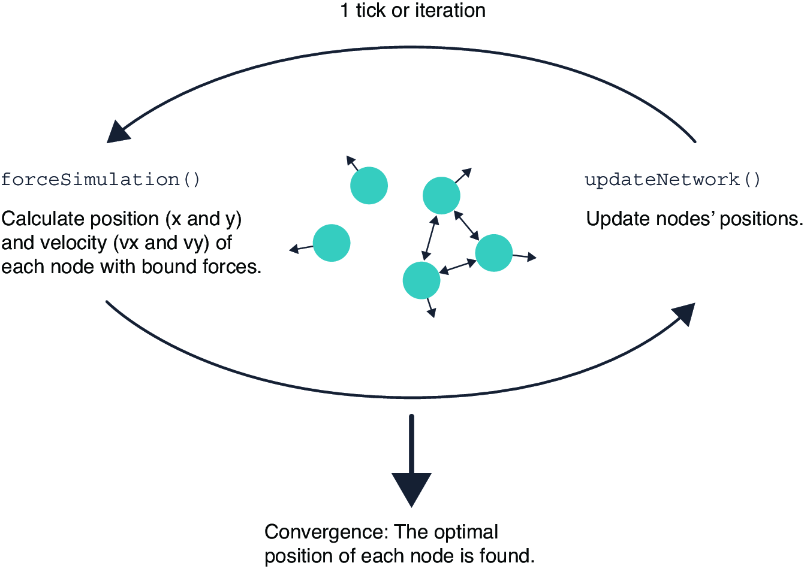
Follow the tick cycle: forces update node motion, the callback updates the display, and the layout settles into a final arrangement. section 12.4.1
Build a D3 force layout in a small sequence:
- Create SVG circles from node data without setting their initial cx and cy coordinates. section 12.4.1
- Start forceSimulation(), provide the nodes, and register a tick callback that assigns cx from x and cy from y. section 12.4.1
- Add forceX() and forceY() to pull nodes toward target coordinates; adjust strength() to control each pull. section 12.4.1
- Add forceCollide() with a radius to keep circles apart, combining it with positioning forces for a beeswarm-like shape. section 12.4.1
- Use forceCenter(), forceManyBody(), or forceLink() when a network needs centering, attraction or repulsion, and link-based relationships. section 12.4.1
Cluster paintings at month-axis tips
Place each painting near the coordinate for its month with forceX and forceY, then use forceCollide to remove overlap. In a reactive Svelte block, recalculate the forces when related variables change, tune alpha and alphaDecay for faster convergence, and render the simulation nodes using node.x and node.y. section 14.5.2
Beeswarm and network layouts
A collision force plus horizontal and vertical positioning produces a beeswarm plot of normally distributed values or Romeo and Juliet characters. In a network view, node size can encode lines spoken, links can encode shared scenes, and proximity can reflect the number of shared scenes. section 12.4.1
