A positioning force pulls nodes toward a chosen coordinate while a force simulation updates their positions over repeated ticks. Use d3.forceX() for a horizontal target and d3.forceY() for a vertical target. One axis can constrain the layout while leaving the other axis available for nodes to spread out. section 12.4.1 section 12.4
Pass a target such as 0 to either force: forceX(0) draws nodes toward x = 0, and forceY(0) draws them toward y = 0. Applying both targets every node at (0, 0), so pair them thoughtfully with forces that manage overlap. section 12.4.1 section 12.5
Control the pull and turn positions into meaningful structure:
- Set strength() to tune an attraction. Its default is 1; weakening the x-force lets nodes spread more horizontally while remaining strongly drawn to the y target. section 12.4.1
- Give forceX() or forceY() a value from a point scale to pull each category toward its own location and form separate clusters. section 12.4.1
- Combine a positioning force with d3.forceCollide().radius() to keep node centers a minimum distance apart, producing a flattened beeswarm-like arrangement. section 12.4.1
Build a beeswarm layout
Create a forceSimulation() with forceX(d => xScale(d.value)), forceY(0), and forceCollide().radius(7). Bind the sample nodes and update circle positions on each tick. The x scale places values, the y-force flattens the group, and collision prevents overlap. section 12.4.1
Figure 12.13 We can use positioning forces to create clusters. By passing the value returned by a point scale to forceX() or forceY(), we create a distinct group for each house.
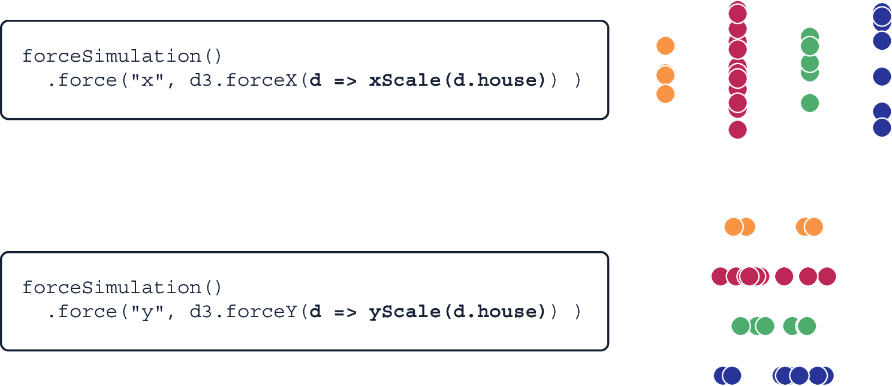
A point-scale target assigned to forceX() or forceY() visibly separates nodes into category-based clusters. section 12.4.1
