A ForeignKey models a one-to-many relationship: each row for one model stores a reference to one row in another model. Put the relationship on the “many” side. A venue can have many rooms because each Room has one venue; putting a single rooms column on Venue would allow only one room. section 4.7.1 section 4.7.2
Give each room a venue
Define the related model first, then add ForeignKey to the model that points at it: class Venue(models.Model): name = models.CharField(max_length=20) class Room(models.Model): name = models.CharField(max_length=20) venue = models.ForeignKey(Venue, on_delete=models.CASCADE) The first argument identifies the related model. Use the class when both models share a file; a string class name can avoid imports and circular-import trouble when they do not. Run makemigrations and migrate after changing the models. section 4.7.1
on_delete is required and says what happens when the related object disappears. CASCADE deletes associated objects too. SET_NULL clears the field instead, but the field must permit NULL values with null=True. This is a database rule with consequences, not decorative framework punctuation. section 4.7.1
After creating a venue and rooms, follow the relation forward with red.venue and backward with cbgb.room_set.all(). The forward lookup returns the single related Venue; the reverse manager retrieves the related Room objects. section 4.7.1
Figure 4.9 One-to-many vs. many-to-many relationships
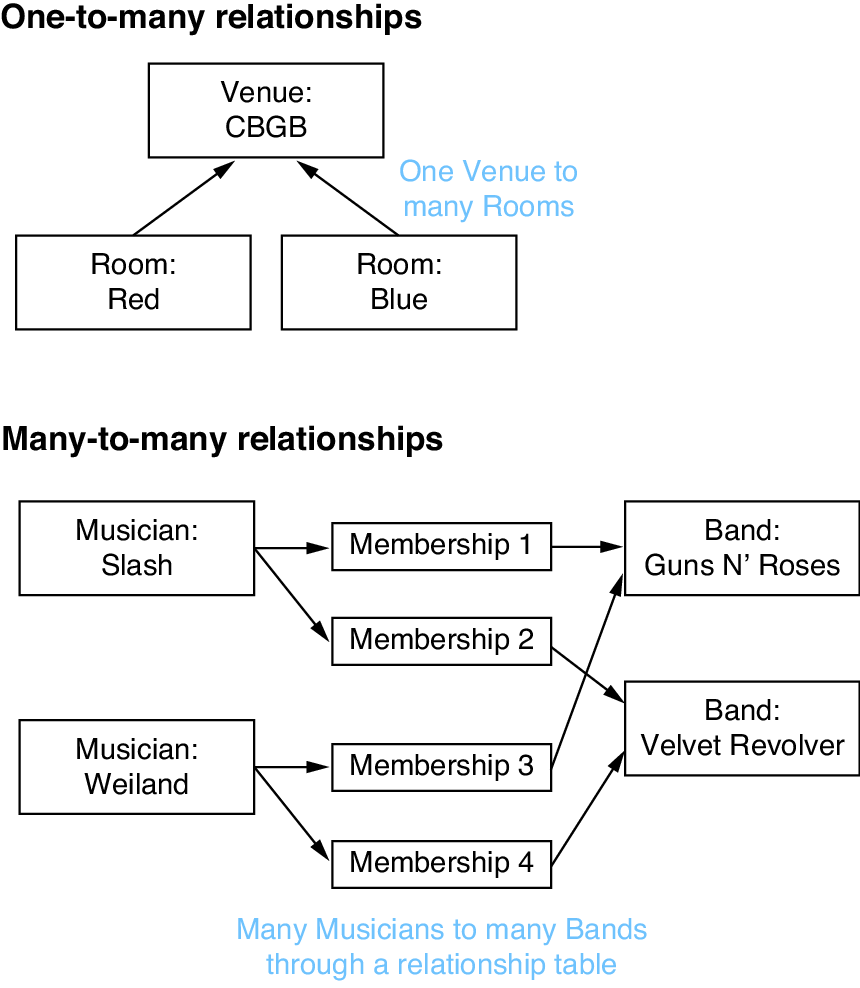
Compare the table shapes before choosing a field: ForeignKey represents one-to-many, whereas many-to-many needs a separate relationship table. section 4.7 section 4.7.2
Choose the field that matches the relationship shape:
- Use ForeignKey when each object on the field-owning model points to one related object, while that related object can have many of them. section 4.7.1
- Use ManyToManyField when objects on both sides can have multiple counterparts; Django creates a separate relationship table rather than a column on either model table. section 4.7.2
