liveBook · Manning

Format method

As explained in Python Workout: 50 ten-minute exercises

str.format is a Python string method that produces formatted text by substituting values into replacement fields.

When output combines values of different types or must fit fixed columns, str.format substitutes arguments into numbered replacement fields such as {0}, {1}, and {2}. section 3.22 section 1.6

The method becomes especially useful when formatting structured output:

  • Unpack a tuple into separate format arguments with format(*person). section 3.22
  • Add a colon and format specification inside a field, as in {1:10}, to create a padded ten-character column. section 3.22
  • Format floating-point values with controlled precision, width, alignment, and padding. section 3.22

A minimal substitution

Use 'Hello, {0}'.format('world') to place a value into a replacement field. The same task can use an f-string, but str.format remains useful when arguments are supplied separately. section 1.6
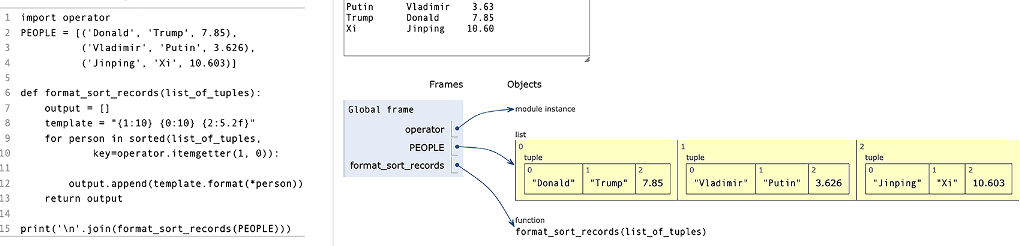
Figure 3.11 Iterating over our list of tuples (from the Python Tutor)

Trace tuple iteration while formatted values are prepared for aligned output. section 3.22

How Python Workout: 50 ten-minute exercises covers it

How deep it goes
Explains positional fields, tuple unpacking, widths, alignment, padding, and floating-point precision.
Examples
Uses a guessed number, Hello world, and sorted people tuples with aligned travel-time columns.
What it assumes
Assumes familiarity with tuples, iteration, function arguments, and basic string output.
What you can do after
Apply it via Python's str.format method to substitute values and produce controlled text layouts.
How it connects
Connects string formatting with tuples, argument unpacking, f-strings, and numeric formatting.

Also explained in

Compare how 3 books explain format method →

Related concepts

This explainer was generated by Manning's knowledge graph from the text of Python Workout: 50 ten-minute exercises. The section links point to the parts of the book it draws on.

