Full duplex lets an interface send and receive data at the same time. This improves performance compared with half duplex, where transmission must take turns. Simplex is the one-way alternative. section 8.1.3 section 8.4
Switched wired Ethernet normally operates in full duplex: each device has its own collision domain, so simultaneous transmissions do not collide on the link. Wireless LANs and hub-based Ethernet use half duplex instead. section 8.1.3 section 8.4
Apply these operational rules:
- Use duplex auto for end-device connections when practical; autonegotiation advertises capabilities and selects the best shared mode, usually prioritizing full duplex. section 8.2
- Configure duplex full manually only when the connected interface is configured compatibly; mismatched settings can leave both interfaces up while severely reducing performance. section 8.3.2
- Check show interfaces status for Duplex values: a-full indicates autonegotiated full duplex, while full indicates manually configured full duplex. section 8.1.3
Cisco interface configuration
SW1(config)# interface g0/1 SW1(config-if)# duplex full SW1(config-if)# interface range f0/1-2 SW1(config-if)# duplex auto The first command manually sets G0/1 to full duplex; the second setting restores autonegotiation for the Fast Ethernet range. Verify the result with do show interfaces status. section 8.1.3
Figure 8.2 Four PCs are connected to a hub, and two attempt to transmit at the same time, resulting in collisions. All four PCs are in the same collision domain. (1) PC2 sends a frame addressed to PC1’s MAC address, and PC4 sends a frame addressed to PC3’s MAC address. (2) The hub attempts to flood both frames at the same time, resulting in collisions. Neither PC1 nor PC3 receive their respective frames intact.
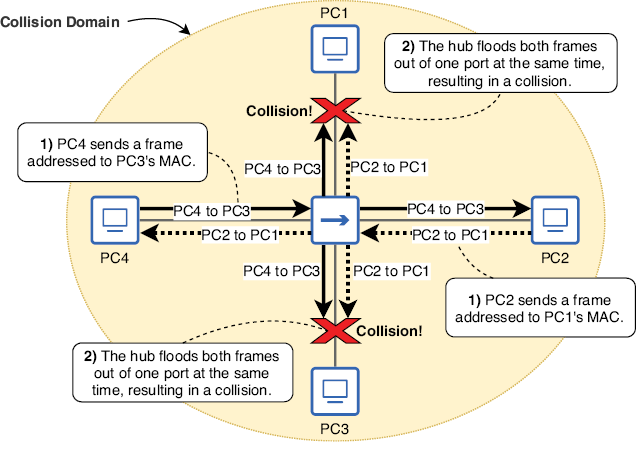
Contrast a hub’s shared collision domain with switched full-duplex links: simultaneous hub transmissions collide, whereas switches isolate connected devices into separate collision domains. section 8.1.3
