Full is the final OSPF neighbor state. Routers in Full state are fully adjacent: they have exchanged link-state advertisements and synchronized their link-state databases. This synchronization allows them to exchange routing information reliably. The sequence leading to Full is Down, Init, 2-Way, ExStart, Exchange, Loading, and Full; a general understanding of each state and its order is sufficient for CCNA-level study. section 18.3.1 section 18.5
Interpret Full according to the OSPF network type:
- On a broadcast segment, routers form full adjacencies with the designated router (DR) and backup designated router (BDR). DROthers remain in the 2-Way state with one another. section 18.3.2 section 18.5
- On a point-to-point connection, the routers establish a Full adjacency without electing a DR or BDR. section 18.3.2
- Verify the state with show ip ospf neighbor; output such as FULL/DR, FULL/BDR, or FULL/- indicates a synchronized adjacency and identifies the neighbor’s segment role. section 18.3.2 section 18.5
Checking a point-to-point adjacency
Configure the same point-to-point network type on both interfaces with ip ospf network point-to-point. The neighbor table can then show FULL/- for the connected router, confirming Full adjacency without DR/BDR election. section 18.3.2
Figure 18.9 The OSPF neighbor states: Down, Init, 2-Way, ExStart, Exchange, Loading, and Full. Routers that reach the 2-Way state are OSPF neighbors. Some routers remain in this state, and some proceed to establish a full adjacency.
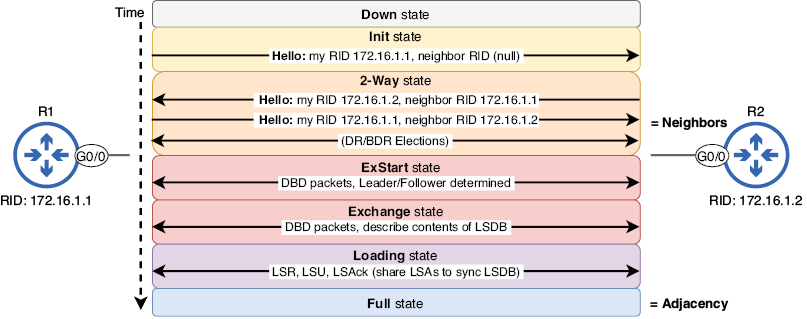
Use the neighbor-state diagram to place Full after Down, Init, 2-Way, ExStart, Exchange, and Loading, and to distinguish full adjacencies from ordinary 2-Way neighbor relationships. section 18.3.1
