An OSPF neighbor relationship forms when two OSPF-enabled routers discover and acknowledge each other. Reaching the 2-Way state makes them neighbors; reaching Full synchronizes their link-state databases and creates an OSPF adjacency. section 18.1 section 18.3.1
Routers progress through these states while establishing a relationship:
- Init: a router has received a hello but has not yet seen its own router ID acknowledged. section 18.3.1
- 2-Way: both routers see and acknowledge each other, but have not exchanged routing information. Designated-router and backup-designated-router elections may occur here. section 18.3.1
- ExStart and Exchange: routers select a DBD exchange leader and exchange database-description summaries. section 18.3.1
- Loading and Full: routers request, send, and acknowledge specific LSAs, then enter Full after synchronizing their LSDBs. section 18.3.1
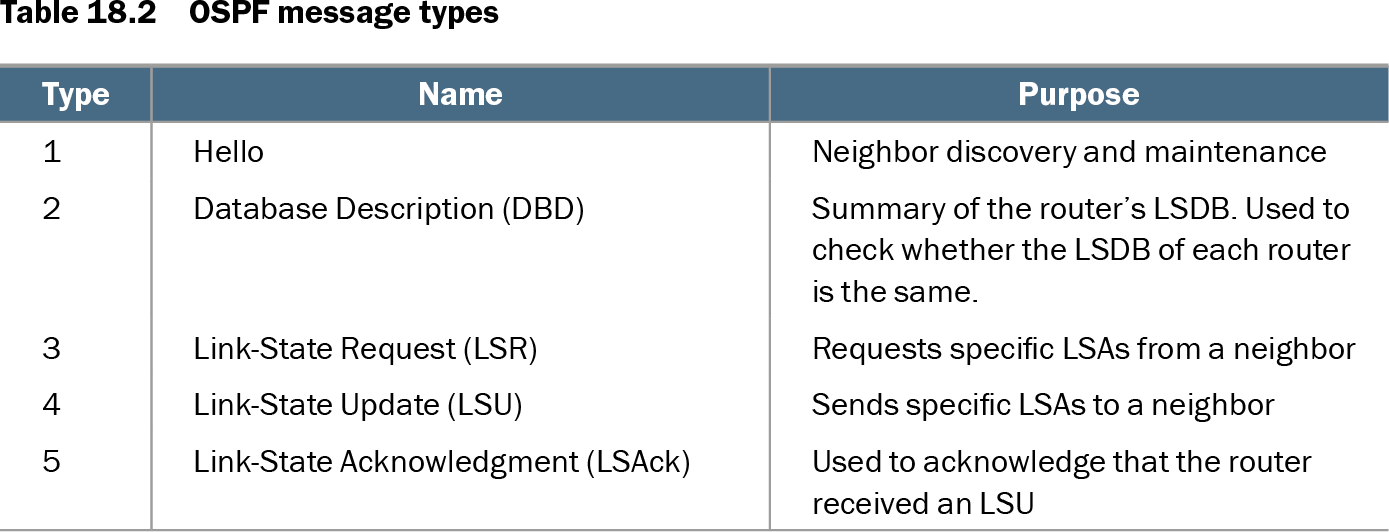
Table 18.2 OSPF message types (view table figure)
| Summary of the router’s LSDB. Used to check whether the LSDB of each router is the same. |
||
Use the message-type table to connect each stage with its OSPF packet: Hello discovers neighbors, DBD compares LSDB summaries, LSR requests LSAs, LSU sends them, and LSAck confirms receipt. section 18.3
Diagnosing a failed adjacency
R1 and R2 must agree on settings such as area number, IP MTU, network type, OSPF process status, hello and dead timers, and authentication. Their router IDs must be unique. For example, assigning R2 to area 1 while R1 uses area 0 produces no neighbor relationship; correcting R2 to area 0 allows the routers to reach Full. The command show ip ospf neighbor displays the current state, while changing an incorrect timer, netmask, or router ID can take an existing adjacency from Full to Down. section 18.3.3
A Full adjacency enables synchronized routing information exchange. LSAs carried in LSU messages populate the shared LSDB, supporting OSPF route calculation after neighbor formation. section 18.3.1 section 18.5