A geographic information system (GIS) loads, analyzes, edits, and visualizes geographically referenced data. It commonly combines datasets as layers, placing roads, buildings, boundaries, businesses, demographics, and environmental conditions on a shared map. section 10.1
Choosing a grocery-store location
Whole Foods can combine Miami boundaries, roads, buildings, existing stores, competitors, sociodemographic data, traffic, flooding, and surf history. Overlaying these layers helps identify promising areas, estimate customer and delivery access, and plan for environmental risks. section 10.1
A GIS supports practical geospatial workflows such as:
- Loading geographic datasets into a shared map. section 10.1
- Analyzing relationships among physical, commercial, demographic, and environmental layers. section 10.1
- Editing and visualizing database-backed geometries through QGIS. section 10.4
Figure 10.1 Configuring a PostGIS connection in QGIS
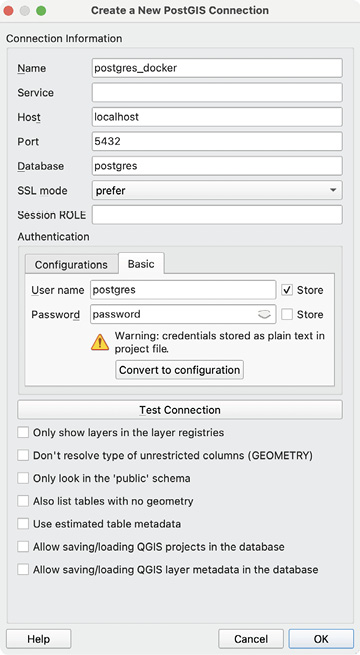
Use the connection configuration as a practical starting point for linking QGIS to a PostGIS database. section 10.4
