A map represents geographic locations and their relationships. It can communicate where things are quickly, then layer on information such as routes, distance, direction, concentration, or quantities. Maps are among the oldest forms of data visualization: the Turin Papyrus Map recorded roads and resources in Egypt more than three thousand years ago. section 1.4.2 section 6.3
A map is powerful because location is often the question. It can help someone find nearby services, compare travel routes, follow a wildfire’s spread, or see where smoke is moving. That same power demands care: a map can enlighten, but it can also make viewers misread or overvalue what its visual design emphasizes. section 6.3
Choose the map form to match the geographic story:
- Use a choropleth—color-filled areas—when the subject is genuinely about land, such as land use. section 6.3.1
- Avoid treating a large colored area as evidence of many people or many events; sparsely populated land can visually dominate an election map. section 6.3.1
- Use positioned circles when location, vote difference, and vote percentage all matter; size and color can carry different parts of the comparison. section 6.3.1
- Use a density map to reveal concentrations of observations, with darker, more saturated color making high-concentration places easier to spot. section 6.3.1
- Use a hexbin map when equal-sized geographic units better support the comparison than each region’s physical area. section 6.3.1
Why a county election map can mislead
A basic county choropleth of the 2016 U.S. presidential election looks overwhelmingly red because it gives every county’s land area visual weight. Showing each winner’s vote percentage adds detail, but still leaves the land-area effect. People vote, not land: placing circles at county locations and sizing them by vote difference provides a more relevant signal. section 6.3.1
Before publishing, ask what the map is actually making prominent. If the answer is land area or population density rather than the intended message, change the encoding or choose another chart. A map should tell the story you mean to tell—not merely decorate it with geography. section 6.3.1 section 6.4
Figure 6.15 Instead of filling in the border of the counties with color, we can use a circle to show the location of the county, size the circle by the difference in the number of votes, and then color the circle by the percentage of votes being Democrat or Republican. (Data source: McGovern et al. [1])
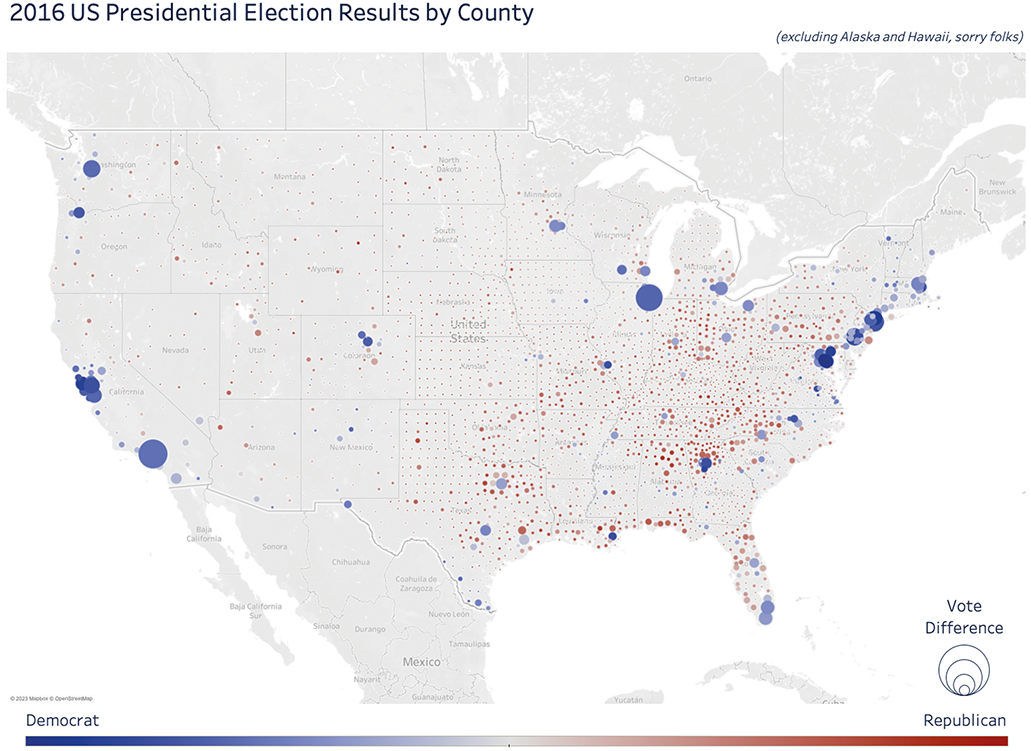
Compare the circle-based election map with filled counties to see how location, vote difference, and vote percentage can be separated into distinct visual signals. section 6.3.1
