Git is a free, open-source version-control tool for tracking a codebase over time. It helps data scientists and other developers work on the same files without overwriting one another’s changes, retain a backup of the codebase, and package work for hand-off or production. A repository holds the files being tracked; it can exist locally and on a shared remote repository. section 2.1 section 2.2
Figure 2.10 This diagram shows a sample Git workflow from using git init to initialize a new local repo, to git push to update a remote repository with local changes, and git pull to get the latest updates from the remote repo.
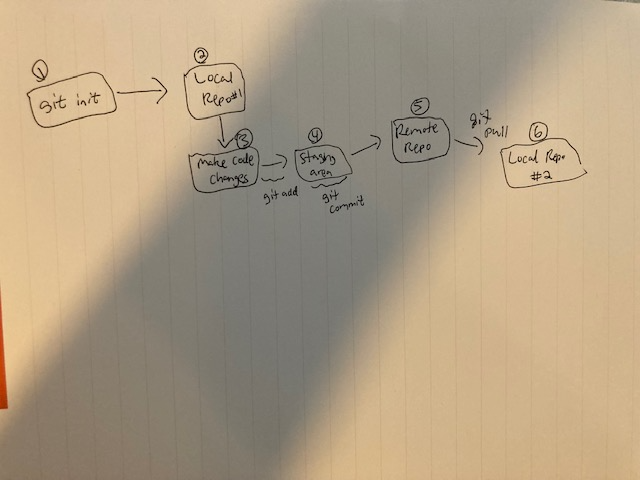
Follow the flow from creating or initializing a local repository, through staging and committing changes, to pushing updates and pulling teammates’ work. section 2.6
A typical workflow separates checking, saving, and sharing work. Use git status to see files that are new or modified but not committed. Use git add to place changed files in a staging area, then git commit -m "message" to save a named snapshot in version-control history. Use git push to send committed local changes to a remote repository, where collaborators can download the updated codebase. section 2.3.2 section 2.6
Start either from an existing shared repository or from local project files:
- Clone an existing repository with git clone followed by its URL. Cloning downloads the files and sets the downloaded folder up for Git tracking. section 2.2.1
- Create a repository for a local directory with git init, then use git add . to stage its files and git commit -m "message" to create an initial snapshot. section 2.3
- Connect a local repository to a remote with git remote add origin [URL], choose main with git branch -M main, and publish with git push -u origin main. section 2.3.1
- Pull the most up-to-date remote changes with git pull; use git merge to merge one branch into another. section 2.6
Tracking a data-processing script
Suppose a project gains 1_process_data.py, a Python script that reads data from a database and performs basic processing or cleaning. Run git status to confirm that the file is untracked, git add 1_process_data.py to stage it, and git commit -m "create 1_process_data.py for processing data" to record it. Push afterward so others can obtain the new script. Later, git log identifies commits and their hash IDs; git show followed by a hash displays a commit’s contents, such as added pandas code in a feature-creation file. section 2.3.2 section 2.3.3
Branches are alternate snapshots of the same codebase. They are useful for experimental features, alternative models, or separate test scripts while the main branch remains closer to production-ready code. Branches can ultimately be merged back into main. When concurrent work conflicts, one option is to edit the conflicting line and commit it; another is git checkout --theirs [file] to keep the remote version of a conflicted file. section 2.5 section 2.4.2
Git can be used from a terminal or through a user interface such as GitHub’s web UI, SourceTree, or GitKraken. The command-line workflow is especially direct: clone or initialize, add, commit, push, pull, and merge as needed. section 2.2 section 2.6