liveBook · Manning

Git Flow

As explained in Lead Developer Career Guide

A software development methodology that organizes work in Git through designated branches and branch-based integration practices.

Git Flow organizes Git work around designated branches: the main branch holds production-ready code, while the development branch collects new features. section 5.1.1

Document the workflow so teammates can follow the same path:

  • Define naming rules for feature and hotfix branches. section 5.1.1
  • Push completed work to QA and staging for testing and validation. section 5.1.1
  • Merge completed features into the main branch and document deployment procedures. section 5.1.1
  • Record how to handle merge errors and cherry-pick necessary commits. section 5.1.1
Figure 5.1 Example deployment process chart
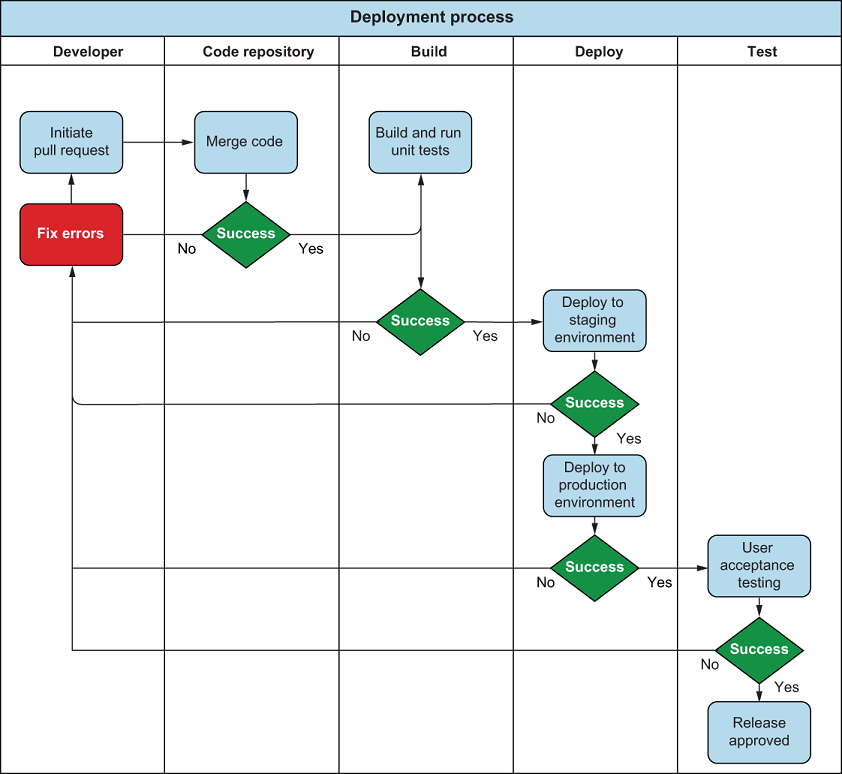
Use the deployment process chart to visualize the documented path from changes through validation and release. section 5.1.1


How Lead Developer Career Guide covers it

How deep it goes
Defines main and development branches, then outlines naming, QA, merging, error handling, and deployment documentation.
Examples
Uses main and development branches, feature and hotfix naming, QA, staging validation, production merges, and a deployment chart.
What you can do after
Operate/configure it by documenting branch names, validation stages, merge handling, cherry-picking, and deployment steps.
How it connects
Connects Git with feature branches, hotfixes, testing, staging environments, deployment, merge errors, and cherry-picking.

Also explained in

Compare how 3 books explain Git Flow →

Related concepts

This explainer was generated by Manning's knowledge graph from the text of Lead Developer Career Guide. The section links point to the parts of the book it draws on.
