A GitHub-hosted runner is a GitHub-managed virtual machine that executes a GitHub Actions job. Choose its operating system with the job’s runs-on setting, such as windows-latest. The runner checks out repository code, runs commands and actions, and produces artifacts for later jobs. section 12.2.2 section 12.4
Hosted runners are available for Linux, Windows, and macOS. They remove the need to provision and link your own build machine, making them useful for automated builds. Platform choice still matters: an Android build can run on Windows, while an iOS build requires a macOS agent. section 12.2.2 section 12.2.3
Set up a hosted-runner build job in practical steps:
- Set runs-on to the required hosted environment, for example windows-latest for an Android job. section 12.2.2
- Check out the repository, then install the required .NET SDK and .NET MAUI workload on the runner. section 12.2.2
- Retrieve signing data from GitHub Actions secrets, build with dotnet publish, and upload the signed output as an artifact. section 12.2.2
For iOS, weigh a hosted macOS runner against a self-hosted runner. Hosted macOS use carries a 10× minutes penalty relative to the Linux baseline; Windows has a 2× penalty. A failed or long-running macOS workflow can therefore consume the available monthly hosted-runner quota quickly. A self-hosted runner avoids that quota concern and is recommended for macOS jobs, though hosted macOS remains an option when you do not have a Mac. section 12.2.3 section 12.4
Android build on a hosted Windows runner
An Android job can use runs-on: windows-latest. It checks out the app, decodes a base64-encoded keystore from secrets with PowerShell, installs .NET 7 and the MAUI workload, runs dotnet publish for net7.0-android with signing properties, and uploads the signed .aab file. The artifact can then be consumed by a deploy job. section 12.2.2
Figure 12.8 The first step in this job checks out the code from the repo. The next will retrieve the Android signing keystore from GitHub Actions secrets and convert it from a base64 string. The next two steps set up dependencies (.NET and the .NET MAUI workloads). After that, the next step creates a signed build, and the final step uploads the signed build to GitHub, ready for the deploy job to pick it up later.
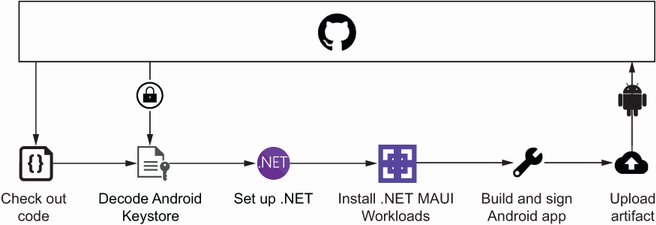
Use this workflow diagram to trace the runner’s complete Android job: checkout, keystore recovery, dependency setup, signing, and artifact upload. section 12.2.2

