GKE Connect is the Anthos component that links Kubernetes clusters to Google Cloud. Its Connect Agent opens a persistent outbound connection, allowing Google Cloud services and users to proxy authenticated Kubernetes operations without exposing the cluster to inbound internet traffic. section 2.3.2 section 5.1.1
Connect divides responsibility across the cluster, Google Cloud, and identity systems:
- Deploys the Connect Agent as a Kubernetes deployment and maintains a persistent TLS 1.2 connection to Google Cloud. section 5.1.1
- Proxies console requests to Kubernetes APIs while preserving cluster RBAC and authenticating each request stage. section 2.3.2
- Requires project-level Google Cloud IAM access in addition to permission within the cluster. section 2.3.2
- Uses egress from the cluster to Google Cloud; inbound firewall access from Google Cloud is unnecessary. section 5.1.1
Register clusters with the gcloud command-line tool, selecting the Google Cloud project and fleet and installing the agent through Workload Identity or a Google Cloud service account. Anthos-created GKE, AWS, and Azure clusters receive the agent during creation; EKS, AKS, OpenShift, Rancher, and other external clusters require separate deployment. Console interaction additionally requires Cloud Identity through Connect Gateway, a bearer token, or OIDC. section 2.3.3 section 5.1.1 section 5.3
Attaching an external cluster
For an EKS or AKS cluster, generate a kubeconfig containing the cluster server, certificate authority data, and service-account token. Provide that kubeconfig, a Google service account, and its key to the generated gcloud registration command. After the Connect Agent is deployed, the cluster appears in Google Cloud Console. section 5.3
Use the console to inspect workloads, node conditions, Docker and kubelet information, memory pressure, and unschedulable Pods across clusters. Console YAML editing can help with triage or development, but production changes should not rely on this emergency-oriented workflow. section 5.1.3
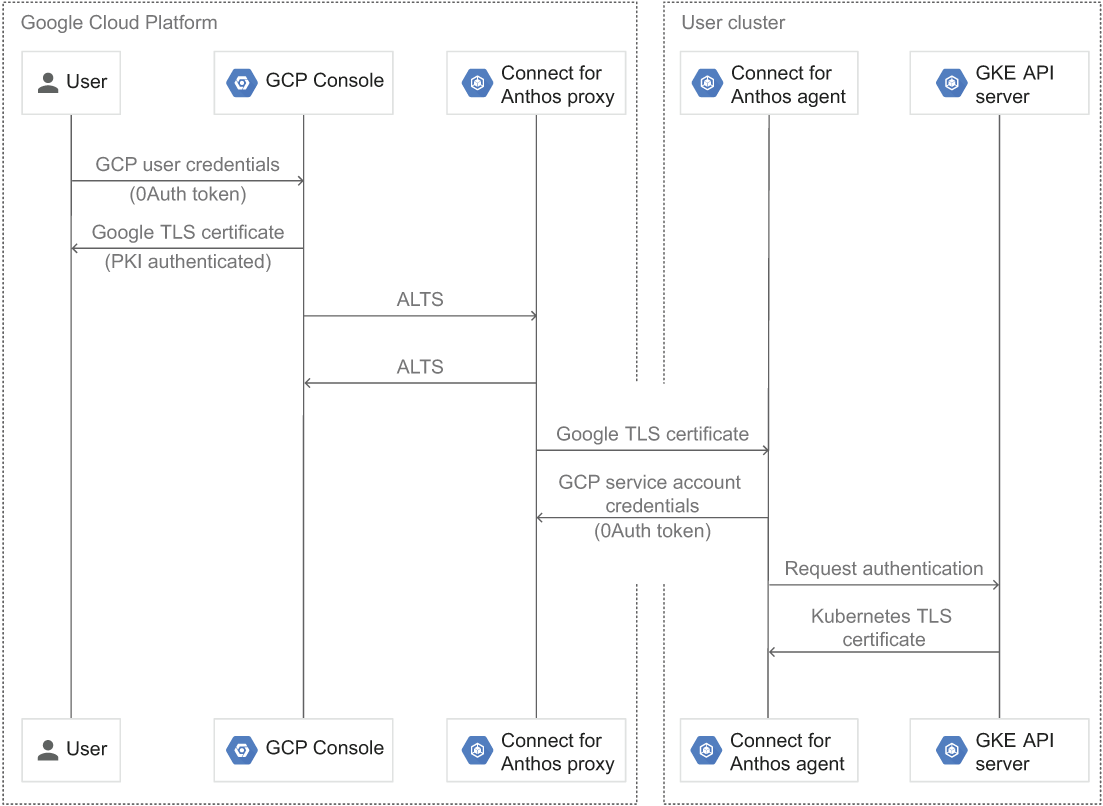
Trace request validation from Google Cloud through the Connect Agent to the cluster and back. section 2.3.2
