Google Fonts provides hundreds of free web fonts that you can load onto a website instead of hosting font files yourself. The service handles font hosting and licensing, making web typography easier to add without chasing permissions. section 18.3
Add a Google Font with this small workflow:
- Choose a typeface on Google Fonts and select the styles you need, such as regular, italic, or bold. section 18.3
- Copy the generated <link> tags into the page's <head>, before your own CSS link or <style> element. section 18.3
- Use the chosen family in CSS with a fallback, such as font-family: Lato, sans-serif;. section 18.3
- Limit the number of linked fonts because remote font files can add loading time, even though major hosts optimize delivery. section 18.3
A readable pairing
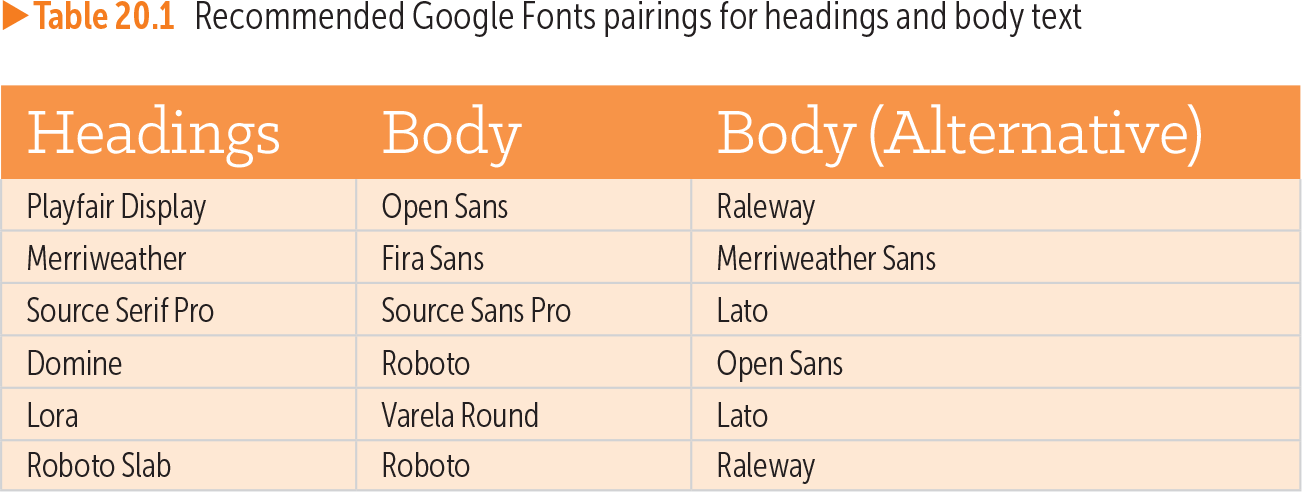
A portfolio page might use Playfair Display for headings and Open Sans for body text. The generated Google Fonts link loads both families, while CSS assigns each family to its appropriate text. section 20.3
<link rel="preconnect" href="<a class="urlb" href="https://fonts.googleapis.com">https://fonts.googleapis.com</a>"> <link rel="preconnect" href="<a class="urlb" href="https://fonts.gstatic.com">https://fonts.gstatic.com</a>" crossorigin> <link href="<a class="urlb" href="https://fonts.googleapis.com/css2?family=Lato">https://fonts.googleapis.com/css2?family=Lato</a>:ital,wght@0,400;1,400;1,700&display=swap" rel="stylesheet">
Inspect the generated HTML links for preconnecting to Google's font hosts and loading Lato with regular and italic weights. section 18.3
Figure 20.2 When deciding on a typeface that will render well even on small displays, look for larger counters and apertures, good x-height, and low stroke contrast.
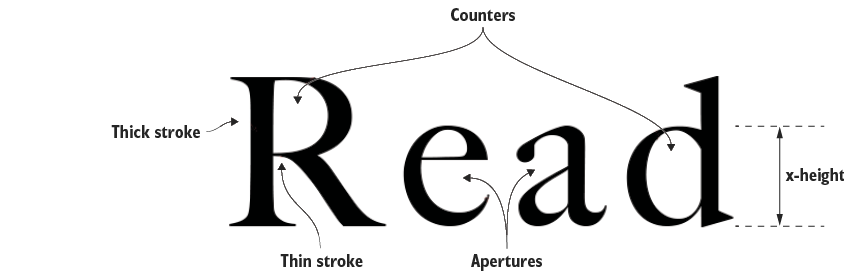
Use the figure as a visual checklist when judging whether a typeface remains legible on small screens. section 20.3
Table 20.1 Recommended Google Fonts pairings for headings and body text (view table figure)
| Headings |
Body |
Body (Alternative) |
|---|---|---|
| Playfair Display |
Open Sans |
Raleway |
| Merriweather |
Fira Sans |
Merriweather Sans |
| Source Serif Pro |
Source Sans Pro |
Lato |
| Domine |
Roboto |
Open Sans |
| Lora |
Varela Round |
Lato |
| Roboto Slab |
Roboto |
Raleway |
Browse suggested Google Fonts combinations for contrasting heading and body typefaces. section 20.3