A grayscale image represents lightness with shades between black and white. Those shades matter whenever a picture must suggest a smooth edge, a photograph, or a filled shape without relying on full color. section 1.3 section 8.0
Consider a low-resolution diagonal line. With only black and white dots, its stair-step edge is conspicuous, and dots spread along a diagonal can appear less dark than dots in a horizontal or vertical line. On a screen, pixels nearest the intended line can be dark gray and nearby pixels lighter gray. The resulting transition makes the line look smoother. section 1.3
Figure 1.11 Using shades of gray for smoother lines
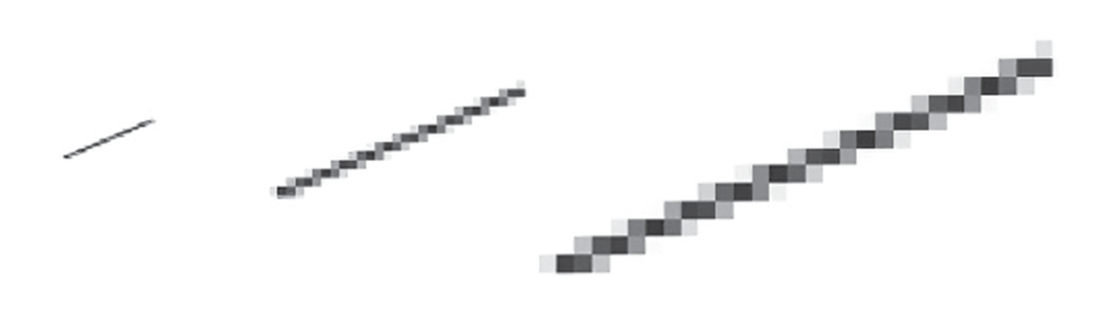
Compare the same line at different scales to see how varying gray shades soften the visible steps of a low-resolution edge. section 1.3
This smoothing is called anti-aliasing: it reduces the jagged edges, or aliasing, that arise when a high-resolution shape is represented at low resolution. The same idea helps with more complex filled forms, such as a character shape. Modern LCD displays build colors and grays from separate red, green, and blue sub-pixels. section 1.3
Gray from black ink
A grayscale image need not be printed with gray ink. Black marks on white paper can simulate intermediate tones through historical printing methods and computer techniques. Approaches range from simple thresholding to digital halftoning and Floyd–Steinberg dithering; related methods can reproduce color with few inks or display images on screens with few colors. section 8.0 section 8.6
Figure 1.12 A shape filled first with black and white dots and then with dots of differing shades of gray

The paired shape makes the trade-off visible: a black-and-white low-resolution rendering versus one using differing gray shades at the same resolution. section 1.3
Grayscale is therefore both a visual scale and a practical workaround. It lets limited marks or limited display resolution suggest gradual changes in lightness, though the long history of woodblocks and halftone photographs shows that convincing reproduction is not automatic. section 8.6


