A Helm chart packages Kubernetes resource definitions so an application or infrastructure component can be installed in a cluster. Installing a chart creates a release: a named application instance. The same chart can create multiple instances. section 2.2 section 5.1.1
Install the Conference application
Run `helm install conference oci://docker.io/salaboy/conference-app --version v1.0.0`. Helm pulls the chart and reports a deployed release named `conference`; `helm list` shows installed releases. This walking-skeleton application includes four services, Redis, PostgreSQL, and Kafka. section 2.2 section 5.1.1
Choose how to use a chart based on what needs to change:
- Use chart templating to adjust settings such as resource consumption and network configuration for a target Kubernetes environment. section 2.5
- Run `helm template` to output YAML when you need to transform resources before applying them to the cluster, including changes the chart does not parameterize. section 2.2
- Do not require a separate chart for every service. A tightly coupled service may be better released as a container image while another team controls the chart that bundles the application. section 3.4.3
Figure 5.2 Provisioning a new PostgreSQL instance using the PostgreSQL Helm Chart. #1 Install a helm chart into a Namespace inside a Kubernetes Cluster; #2 The chart creates Kubernetes resources such as StatefulSets and Deployments to provision a PostgreSQL instance; #3 A Service needs to connect to the newly created instance, this can be done manually or by referencing a Kubernetes Secret that contains the credentials and details on how to connect.
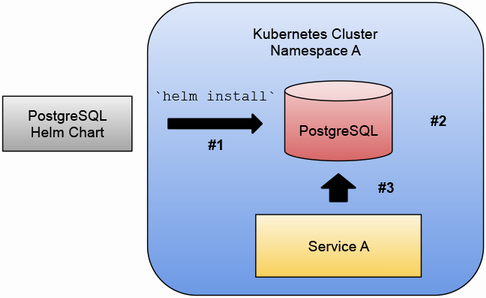
The PostgreSQL example traces chart installation in a namespace, creation of Kubernetes resources, and the connection a consuming service still needs to make. section 5.1.1
Charts make repeatable installation possible, but packaging and deployment need not be manual developer tasks. Automating the path from changed source code to a running release lets developers focus on features. section 2.5


