A Helm chart packages the Kubernetes objects needed by an application so they can be installed and maintained together. It combines YAML object templates with configurable values, typically stored in values.yaml. A template can obtain a Service type or port from that file; a Deployment can obtain an image name or resource requests. This avoids editing each object file separately for routine changes. section 3.3.6
Figure 3.9 The service_template.yaml file defines the K8s service, and the type of service and port are obtained from values.yaml. The template and values form the core of a Helm chart.
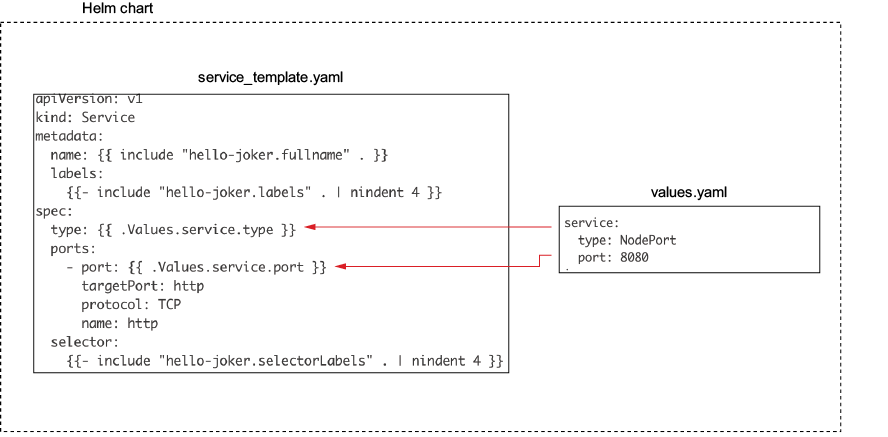
The Service template and values.yaml show the core relationship: the template defines the Kubernetes object, while values supply its customizable properties. section 3.3.6
A practical chart workflow:
- Find an existing chart in a repository such as Artifact Hub, or create a starting chart with `helm create hello-joker`. Inspect Chart.yaml, templates/, and values.yaml before changing deployment settings. section 3.3.6
- Set application-specific values, such as `replicaCount: 3`, an image repository and tag, and a Service type and port. Install the chart into a namespace, then inspect its release with `helm list` and its resources with `kubectl get all`. section 3.3.6
- For automated releases, have GitLab CI test the application, build and push its Docker image, and update the chart with the new image tag. Point Argo CD at the chart’s path in Git to deploy it and compare live resources with the intended configuration. section 3.4.1 section 3.4.2
A Service change that bypasses Git
Suppose a deployed Service is edited directly from ClusterIP to LoadBalancer. Argo CD marks the application out of sync and shows the difference between the live and expected manifests. When automatic synchronization is enabled, Git remains the source of truth rather than the manual cluster edit. section 3.4.2