liveBook · Manning

:host-context() selector

As explained in Web Components in Action

The :host-context() selector is a Shadow DOM CSS selector that matches a shadow host when an ancestor satisfies a specified selector.

The :host-context() selector lets a shadow component change its styling when its surrounding context matches a selector. That is useful when one component needs different layouts or controls in different parts of an application. section 10.1

A Workout Creator example uses the selector to distinguish an exercise in the library from one in the workout plan:

A portable workaround

Because browser support is unreliable, add context directly to the host: use class="library" for library exercises and class="plan" for plan exercises. Replace the contextual selectors with :host(.library) and :host(.plan), as in Listing 10.8.

The selector is not formally deprecated, but Chrome is the only browser identified as supporting it. Safari rejected support as an anti-pattern, Firefox raised performance concerns, and its future in the Shadow DOM specification was considered uncertain. Angular can provide similar behavior at the framework level. section 10.1
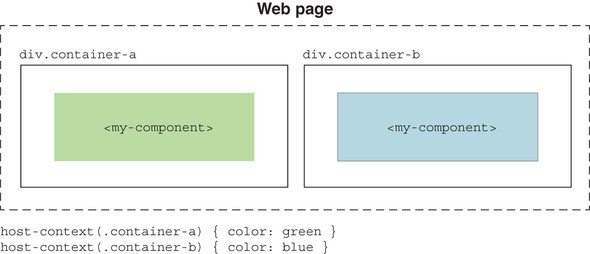
Figure 10.3. Style differently depending on the context of the component with :host-context().

Compare the library and plan presentations of the same exercise component. section 10.1

How Web Components in Action covers it

How deep it goes
Demonstrates selector rules and a class-based replacement, while deferring formal specification and browser implementation details.
Examples
Demonstrates library and workout-plan exercise components, hidden controls, responsive host sizing, and class-based host selectors.
What you can do after
Evaluate when contextual styling is appropriate and replace unsupported selectors with explicit host classes.
How it connects
Connects Shadow DOM styling with CSS selectors, Angular, CSS Variables, CSS Shadow Parts, and design systems.

Related concepts

This explainer was generated by Manning's knowledge graph from the text of Web Components in Action. The section links point to the parts of the book it draws on.