liveBook · Manning

Host operating system

As explained in Acing the CCNA Exam: Volume 2 Advanced Networking and Security

A host operating system is the operating system installed directly on physical hardware that provides services to a hosted hypervisor.

A host operating system is installed directly on physical hardware and provides the operating environment for a hosted, or type 2, hypervisor. The hypervisor runs as an application on the host OS, while operating systems inside virtual machines are guest operating systems. section 17.1.1

The host OS establishes the key distinctions between virtualization models:

  • Type 1 hypervisors run directly on hardware and do not require a host OS. section 17.1.1
  • Type 2 hypervisors use hardware resources through the host OS, trading efficiency for easier setup and use. section 17.4
  • A host OS can support virtual networking through the hypervisor’s virtual switch, which forwards traffic between virtual and physical NICs. section 17.4
Figure 17.5 A type 2 hypervisor runs as an application on a host OS.
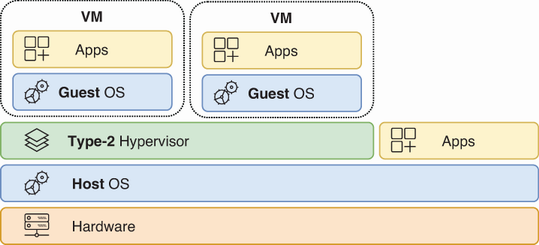
Visualizes a type 2 hypervisor running as an application on a host OS. section 17.1.1

How Acing the CCNA Exam: Volume 2 Advanced Networking and Security covers it

How deep it goes
Defines the host OS and contrasts its resource path with type 1 and type 2 hypervisors, without detailing operating-system internals.
Examples
Illustrates the concept with type 2 hypervisors such as Oracle VM VirtualBox and VMware Workstation.
What it assumes
Assumes basic operating-system terminology while defining host OS, guest OS, hypervisor, and virtual machine relationships.
What you can do after
Evaluate virtualization architectures by identifying when an operating system serves as the host beneath a type 2 hypervisor.
How it connects
Connects host operating systems to hypervisors, guest operating systems, virtual machines, virtual switches, and virtual NICs.

Related concepts

This explainer was generated by Manning's knowledge graph from the text of Acing the CCNA Exam: Volume 2 Advanced Networking and Security. The section links point to the parts of the book it draws on.