liveBook · Manning

HTML element

As explained in Web Design Playground, Second Edition

The HTML html element is the document's outermost element and root of the HTML element tree.

An HTML element is a specific item in an HTML document, such as a paragraph, emphasis, or heading. The html element is the document’s outermost element and the root of its element tree. section 2.1 section 7.6

Think of an element as a small instruction-and-content container:

  • An opening tag uses angle brackets and an element name, such as <h1>. section 2.1
  • A closing tag repeats the name with a forward slash, such as </h1>. section 2.1
  • Together, the tags can contain text or other elements, while telling the browser how to display that content. section 2.1

A heading element

<h1>How New Words Are Created</h1> Here, h1 identifies the element, the opening and closing tags surround the text, and the browser displays it as a first-level heading. section 2.1

Figure 2.1 The structure of a typical HTML tag
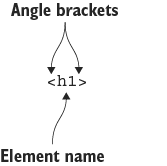
Use the diagram to identify the element name and the angle brackets that form a typical HTML tag. section 2.1


How Web Design Playground, Second Edition covers it

How deep it goes
Defines elements, distinguishes them from tags, explains paired syntax, and identifies html as the root, but stops short of advanced element behavior.
Examples
Uses an h1 heading and contrasts plain text with text organized by basic HTML elements.
What it assumes
Starts with text and introduces HTML syntax without assuming prior HTML, CSS, or web-design knowledge.
What you can do after
Build it from scratch by marking page content with opening and closing HTML tags.
How it connects
Connects HTML elements with HTML tags, headings, paragraphs, links, CSS, and the document structure.

Also explained in

Compare how 4 books explain HTML element →

Related concepts

This explainer was generated by Manning's knowledge graph from the text of Web Design Playground, Second Edition. The section links point to the parts of the book it draws on.

