An HTMX attribute adds behavior to an HTML tag without requiring a full-page reload. It can invoke an HTTP method, choose when the request runs, and control where the returned HTML goes. In Django, the response can be a partial: a reusable piece of a page rather than the complete document. section 12.2 section 12.7
The main attributes divide the interaction into three practical questions:
- What request runs? hx-get performs a GET, while hx-post and other method attributes invoke corresponding HTTP methods. section 12.2
- When does it run? hx-trigger can respond to clicks, page loading, visibility, or events such as key presses. section 12.7
- Where does the response go? hx-target selects an element with a CSS selector, and hx-swap determines which part changes; innerHTML replaces the target's contents. section 12.2 section 12.7
Replacing a random song
A song-details link can use hx-get to request another song. The Django view returns an HTML partial, while hx-target identifies the song element and hx-swap="innerHTML" replaces its contents. For search-as-you-type, an input can send its value as a query parameter; hx-trigger="keyup changed" limits requests to key presses that change the value. section 12.2 section 12.7
Figure 12.1 Using HTMX attributes to change a link into an action that replaces a portion of the page
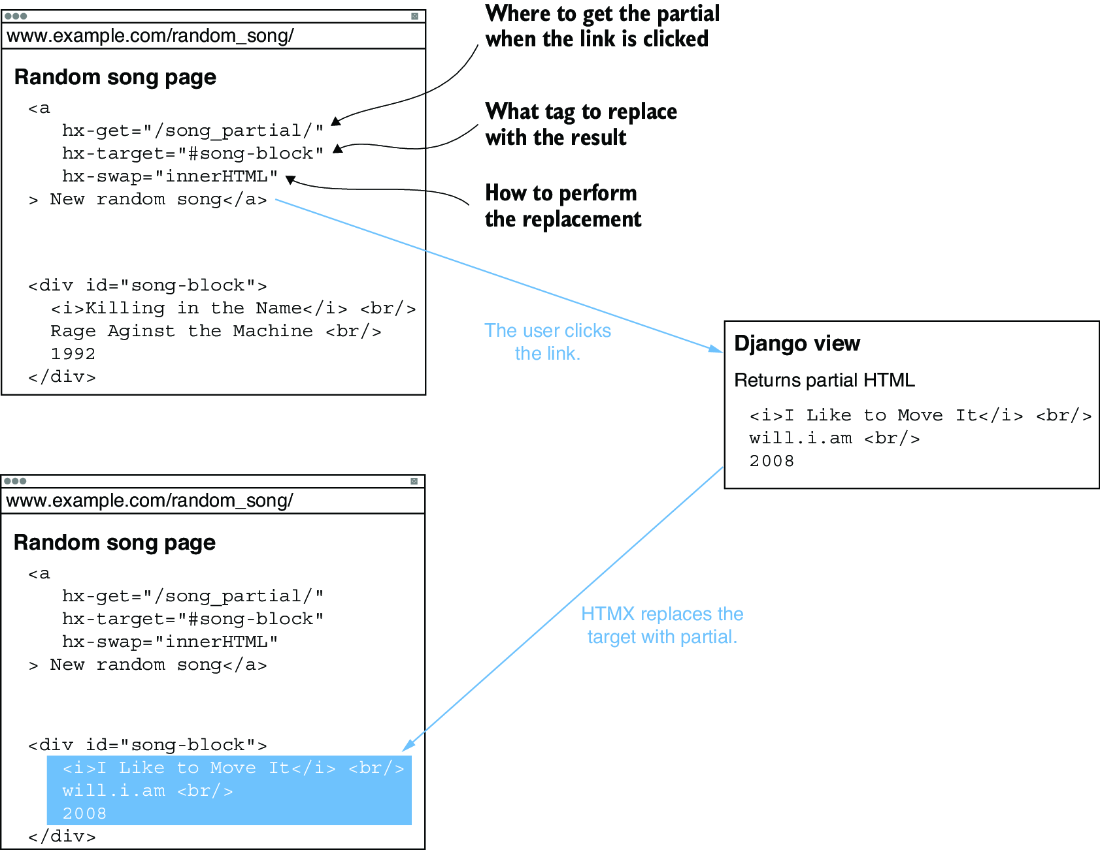
Trace how an HTMX-enabled link invokes a Django endpoint and replaces only the relevant page portion. section 12.2

