An HTTP redirect tells the browser to request a different URL. In a Razor Pages application, it moves users between pages without requiring them to change the address manually. section 15.4.1
Use redirects when:
- A user submits a form and should continue to another page, such as moving from checkout to payment. section 15.4.1
- An application converts an error response into a request for a friendly error page. section 15.5
- The browser should make a second request to the destination URL; the original response and follow-up request remain separate. section 15.5
Redirecting error pages
Configure status-code middleware with app.UseStatusCodePagesWithRedirects("/{0}");. A 404 response becomes a 302 redirect, and the browser requests /404 to generate the error page with a 200 response. section 15.5
Figure 15.3 A typical POST, REDIRECT, GET flow through a website. A user sends their shopping basket to a checkout page, which validates its contents and redirects to a payment page without the user’s having to change the URL manually.
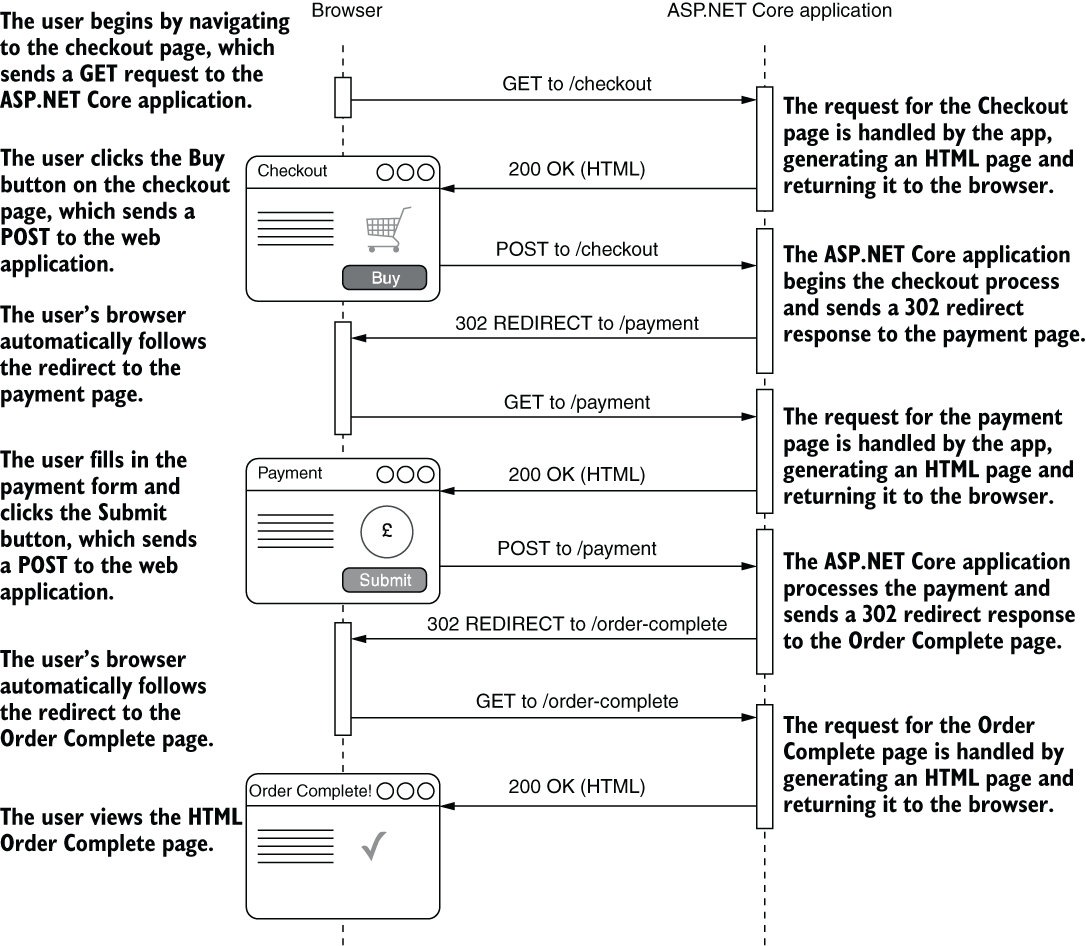
A POST, REDIRECT, GET diagram makes the checkout flow concrete: the browser follows the redirect and reaches the payment page automatically. section 15.4.1
Redirects differ from returning a page directly. A PageResult returns HTML for the current request, whereas a RedirectToPageResult sends the browser to another page. For error handling, re-execution preserves the original status code; redirection loses it, so refreshing requests the error URL instead. section 15.4.1 section 15.5

